


The Core Operational Distinction: Resource Headroom and Isolation
In short: Cloud hosting vs shared hosting: shared hosting puts many sites on one server with shared limits and the lowest price, while cloud hosting gives each account more dedicated resources and headroom for traffic spikes. Shared suits small sites; cloud suits growing stores and busy sites.
When evaluating web hosting infrastructure, the underlying allocation of server resources represents the primary differentiator in day-to-day performance. Traditional shared hosting executes websites within shared resource bounds on a single server environment. The CPU, memory, and disk I/O are managed through per-account limits to keep entry costs accessible. Conversely, cloud hosting provides dedicated compute headroom, elevated memory allocations, and higher concurrent process ceilings to ensure dynamic websites remain responsive under heavy traffic.
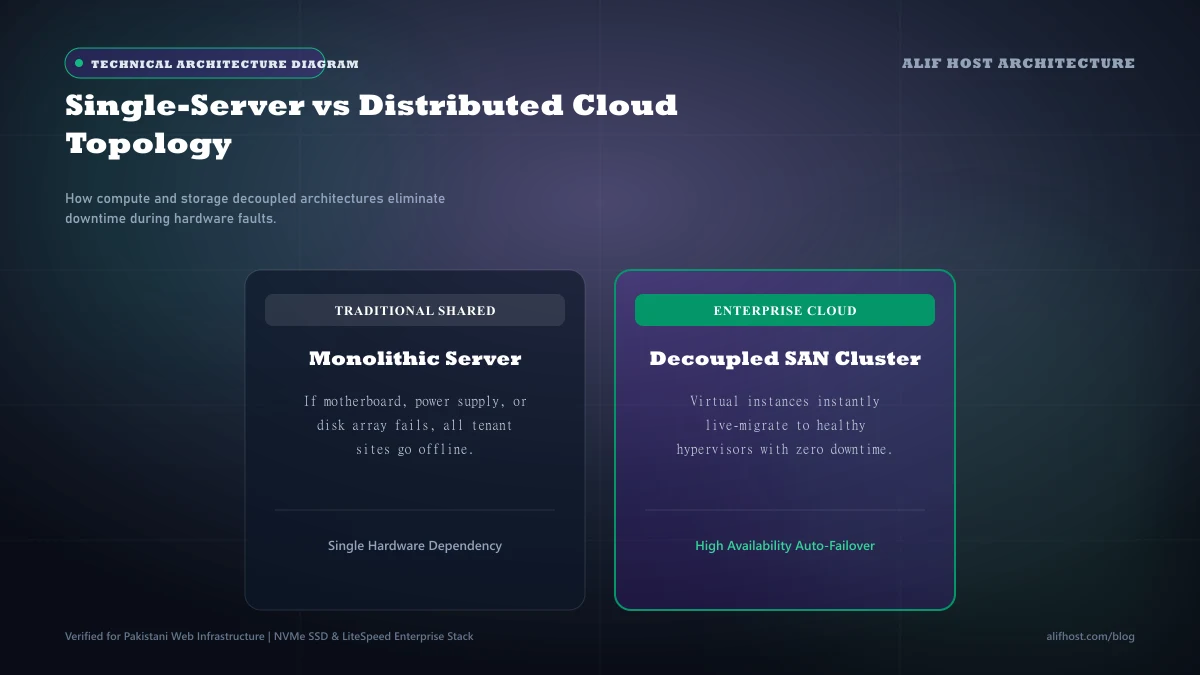
- Resource Headroom: Shared hosting provides standard memory allocations suited for informational websites and blogs, while cloud hosting supplies elevated RAM and CPU allowances for busy online stores.
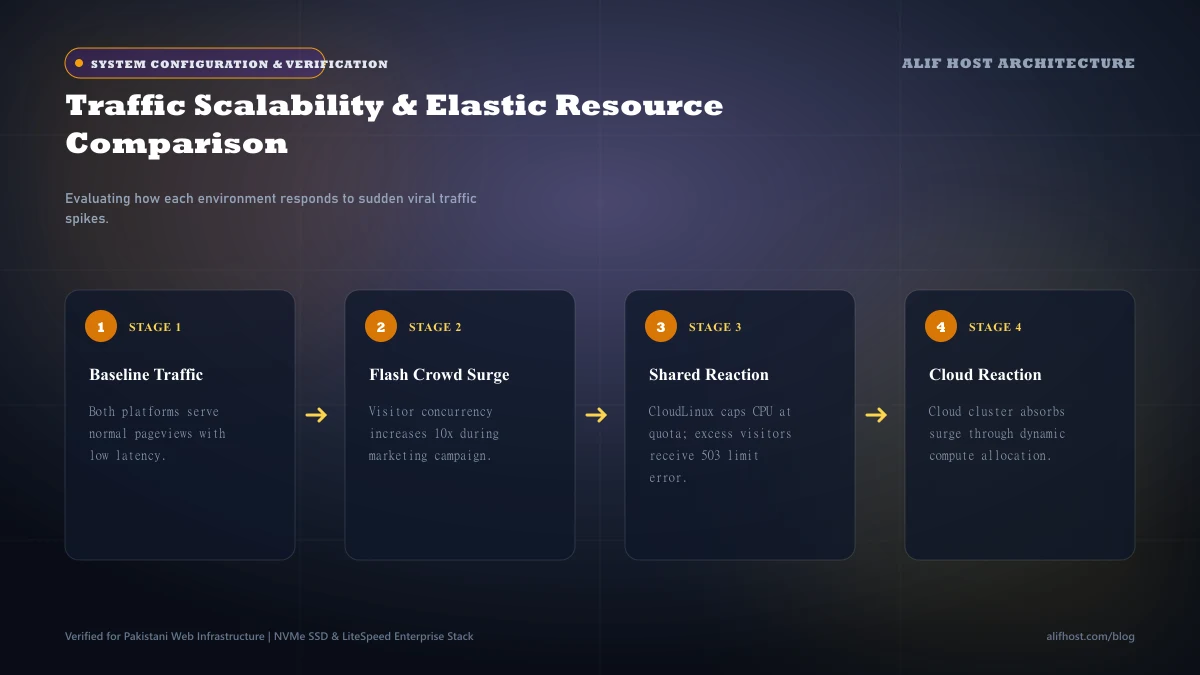
- Concurrent Worker Capacity: Cloud hosting tiers permit significantly more simultaneous PHP worker threads, preventing 503 Service Unavailable errors during traffic surges.
- Storage Performance: Cloud plans allocate larger solid-state storage quotas with higher input/output operations per second (IOPS) for database-heavy applications.
- Turnkey cPanel Management: Unlike an unmanaged virtual server, both shared and cloud tiers at Alif Host include full cPanel administration, eliminating the need for terminal commands.
How Resource Allocation and Performance Headroom Work in Practice
Understanding how system resources are partitioned helps website owners determine when an upgrade from shared hosting to cloud hosting is genuinely required.
1. Memory and Concurrent Execution Threads
On standard shared hosting, each account has strict execution thresholds to ensure fair resource distribution among tenants. On cloud hosting tiers, your account receives substantially higher memory allocations (such as 2 GB, 4 GB, or 8 GB RAM depending on the tier) and doubled entry processes, allowing complex WooCommerce checkouts and database queries to execute smoothly.
2. High-Speed Solid-State Storage
Dynamic content systems like WordPress execute multiple database reads and writes for every single page request. Cloud hosting tiers provide generous solid-state storage with elevated I/O limits, preventing database bottlenecks when multiple shoppers browse product catalogs simultaneously.
Architectural Comparison: Shared Hosting vs Cloud Hosting Matrix
Review the technical specifications below to evaluate which hosting tier matches your website's operational requirements.
| Technical Feature | Shared Hosting (cPanel) | Cloud Hosting (cPanel) |
|---|---|---|
| Target Workload | Portfolios, blogs, and local small businesses | Busy e-commerce stores, catalogs, and agencies |
| Memory Allocation | Standard shared memory tier | Elevated high-capacity RAM tiers |
| Concurrent PHP Workers | Standard entry process limits | High-concurrency worker thresholds |
| Control Interface | Official cPanel dashboard | Official cPanel dashboard |
| SSL & Security | Free automated AutoSSL certificates | Free automated AutoSSL certificates |
| Technical Skill Needed | Beginner friendly | Beginner to intermediate |
| Starting Price | Economical entry (Shared Hosting) | High-capacity tier (Cloud Hosting) |
Workload Sizing: When Does Your Website Need Cloud Hosting?
While cloud hosting delivers higher capacity, it is not required for every simple web project. Use these practical criteria to determine whether upgrading to cloud hosting is appropriate for your situation.
- Active E-Commerce Transactions: If your WooCommerce or Magento store processes orders frequently throughout the day, cloud hosting provides the memory headroom needed to keep the checkout experience fast.
- Marketing Promotions and Traffic Spikes: Websites running social media ad campaigns or seasonal promotional sales benefit from higher concurrent process limits.
- Extensive Dynamic Catalog: Portals with hundreds of product variations, extensive search filters, and member dashboards that require substantial PHP memory.
- Corporate Portals with Custom Email Inboxes: Organizations requiring higher storage allowances and dependable daily email communication.
Predictable Flat-Rate Pricing vs Hyperscaler Invoicing
Many business owners associate cloud hosting with hyperscalers like Amazon Web Services (AWS) or Google Cloud. However, hyperscalers charge separately for complex variables including data egress, storage read/write requests, and control panel licenses.
- Predictable Billing: Alif Host provides clear monthly or annual plans with no surprise bandwidth egress or disk IOPS billing.
- cPanel Included: Avoid expensive third-party control panel licenses; our cloud hosting comes fully equipped with cPanel.
- Local Currency Invoicing: Pay directly in Pakistani Rupees (PKR) without foreign exchange conversion fees or overseas card surcharges.
Data Protection and Backup Best Practices
Regardless of whether you choose shared hosting or cloud hosting, maintaining systematic backup habits is essential for business continuity.
- Full cPanel Backups: Generate complete archive snapshots of your website files, MySQL databases, and email forwarders directly through cPanel.
- Off-Site Storage: Periodically download database dumps and file archives to your local office storage or secure cloud drive.
- Pre-Update Snapshots: Always create a backup before applying major WordPress core, theme, or plugin updates.
Cost-Benefit Evaluation: Choosing the Right Tier for Your Budget
Our shared hosting plans provide an affordable starting point for new ventures, blogs, and corporate brochure websites. As your audience expands and transactional volume increases, upgrading to cloud hosting provides the necessary memory and CPU capacity to support continued growth.
Decision Checklist: Shared vs Cloud Hosting
Review this operational checklist before finalizing your hosting plan selection:
- Expected Monthly Visitors: If you anticipate under 20,000 monthly visits, shared hosting is generally sufficient; for higher traffic or complex catalogs, choose cloud hosting.
- Database Complexity: Sites with advanced search plugins, membership systems, and frequent checkout sessions require cloud memory allocations.
- Budget Considerations: Start with shared hosting and upgrade directly when traffic and revenue justify higher resource tiers.