


Understanding the Core Architectural Difference: Communal vs Dedicated Computing
In short: Shared hosting vs VPS comes down to resources and control: on shared hosting many sites share one server and the host manages everything, while a VPS gives you your own guaranteed RAM and CPU with root access. Start on shared hosting and move to a VPS when traffic or custom software needs it.
To understand the fundamental operational distinction between shared hosting and a Virtual Private Server (VPS), consider the analogy of residential real estate. Shared hosting is comparable to renting a private room in a large communal dormitory where all residents share the same plumbing, electrical wiring, and front entrance. While cost-effective, heavy usage by one resident can impact common facilities. A VPS is like owning an apartment inside a concrete high-rise: you possess your own dedicated electrical breaker, private plumbing, and front door, entirely isolated from your neighbors.
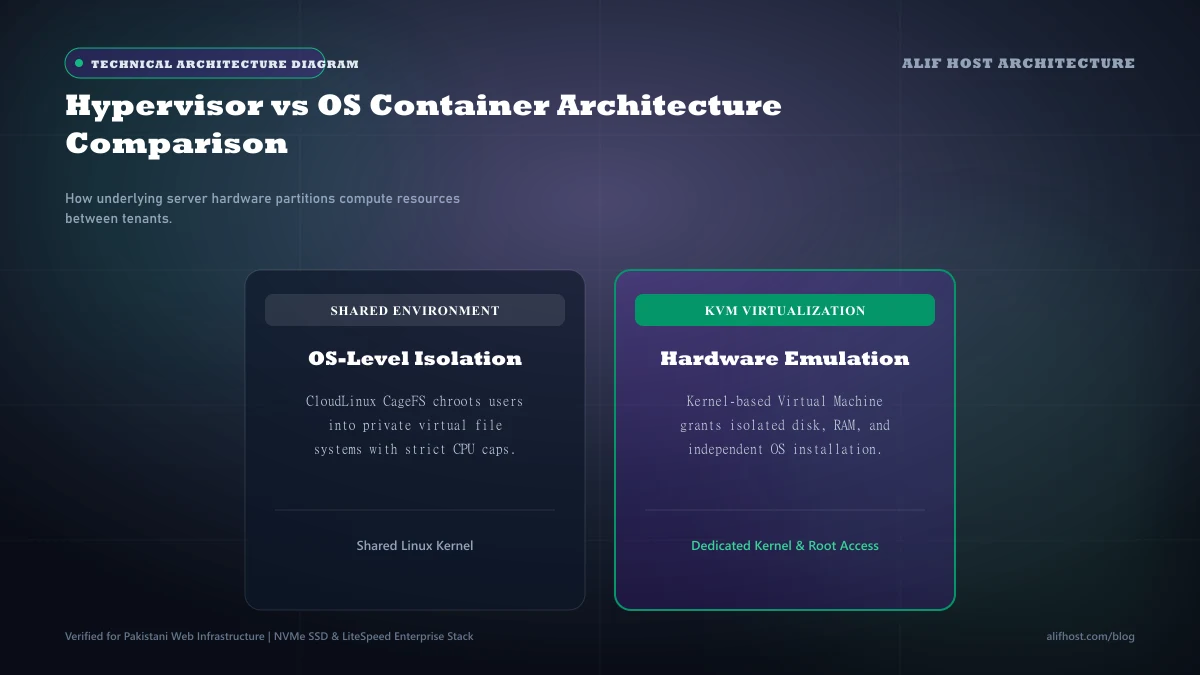
- Shared Multi-Tenancy: Hundreds of accounts operate on a single Linux operating system instance, sharing physical memory, CPU cycles, and network interface cards.
- Kernel-Level Virtualization: KVM hypervisors carve physical server hardware into distinct virtual machines, each running its own independent operating system kernel.
- Management Responsibilities: Shared hosting handles all security patches, web server daemons, and PHP updates automatically. A VPS requires user management or an optional managed support plan.
- Software Customization: Shared hosting restricts custom daemons (such as Docker, Redis, or Node.js background listeners), whereas a VPS grants dedicated virtual compute and SSH access.
Virtualization Deep Dive: How KVM Hypervisors Enforce True Isolation
Not all virtual servers are created equal. Legacy virtualization technologies like OpenVZ operate at the container level, sharing a single Linux kernel across all virtual instances. Under OpenVZ, providers could overcommit physical RAM and CPU cores, leading to sudden slowdowns when multiple instances experienced simultaneous traffic surges.
Kernel-based Virtual Machine (KVM) Architecture
Alif Host deploys KVM hardware virtualization exclusively. Under KVM, each virtual machine functions as a fully independent computer with dedicated virtual CPU cores, completely isolated RAM allocations, and its own dedicated virtual disk controller. Memory allocated to your KVM VPS cannot be borrowed by neighboring tenants, ensuring 100% predictable performance.
- Dedicated Kernel: Run any operating system of your choice, including Ubuntu, Debian, AlmaLinux, Rocky Linux, or Windows Server.
- Guaranteed RAM: Zero memory ballooning or overcommitment; your allocated RAM is permanently locked to your instance.
- Custom Network Stacks: Configure custom firewall rules via
iptables, deploy WireGuard VPN tunnels, and bind private IPv4/IPv6 subnets.
CloudLinux LVE on Shared Hosting
While shared hosting does not provide separate OS kernels, modern platforms utilize CloudLinux to bridge the gap. CloudLinux creates a Lightweight Virtual Environment (LVE) around each cPanel account, establishing hard ceilings on CPU, memory, and concurrent database processes to deliver stability without the administrative overhead of a full server.
Direct Comparison: Shared Hosting vs KVM VPS Specifications
Review the technical comparison matrix below to examine how resource allocation, security isolation, and management overhead differ between shared hosting and virtual private servers.
| Comparison Metric | Shared Hosting (cPanel) | KVM Virtual Private Server (VPS) |
|---|---|---|
| Virtualization Level | OS-level LVE container isolation | Hardware-level KVM hypervisor |
| Operating System | Fixed AlmaLinux / CloudLinux | Choice of Linux distributions or Windows Server |
| Root / SSH Access | Restricted Jail Shell (no sudo) | Dedicated SSH terminal access |
| RAM Allocation | 1 GB to 2 GB per account (LVE bound) | 2 GB to 32 GB dedicated physical RAM |
| CPU Allocation | 1 to 2 vCPU cores (fair-share throttled) | 1 to 8 dedicated vCPU cores |
| Dedicated IP Address | Optional shared pool | Dedicated IPv4 address included |
| Custom Software Daemons | Not permitted (Node/Python via Passenger only) | Full freedom: Docker, Redis, MongoDB, Elasticsearch |
| System Administration | Zero maintenance; 100% managed by host | Self-managed terminal or managed add-on |
| Starting Pricing | From PKR 300/mo (Shared Hosting) | From PKR 2,600/mo (KVM VPS Hosting) |
Concrete Upgrade Triggers: When Is It Time to Switch to a VPS?
Many website owners delay upgrading to a VPS out of fear of technical complexity, while others upgrade too early and waste operating budget. Watch for these clear operational indicators that signal your website has outgrown shared hosting.
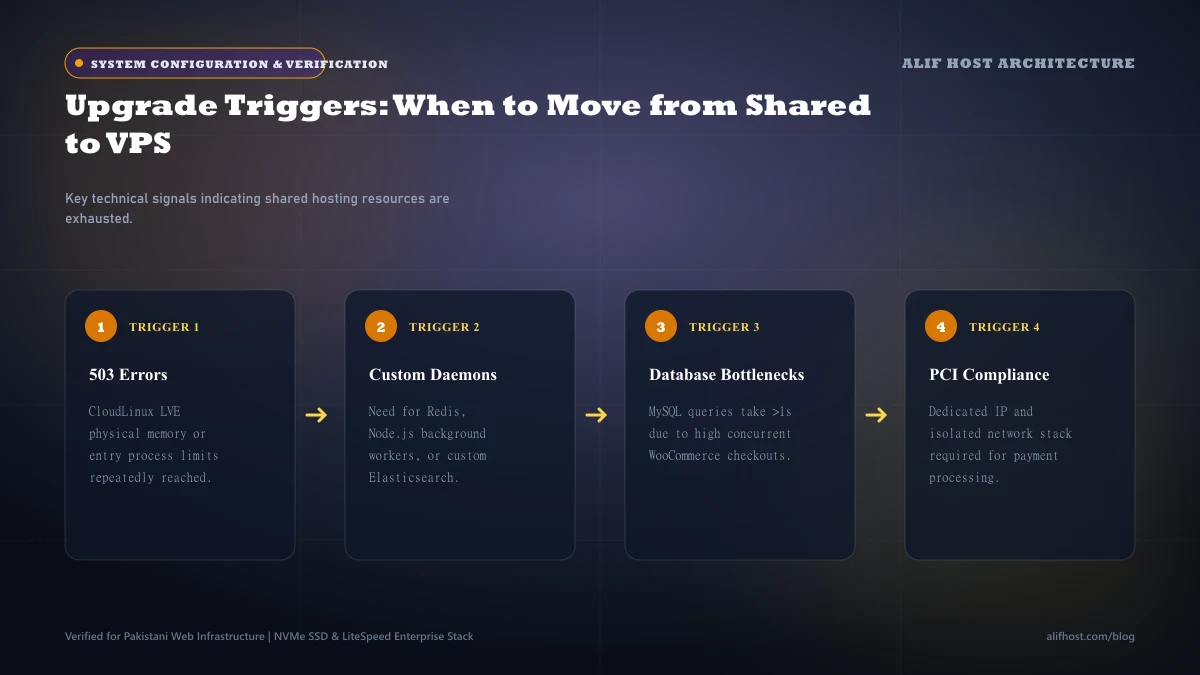
- Consistent HTTP 508 Errors: If your cPanel Resource Usage dashboard shows frequent "Resource Limit Reached" events, your concurrent visitor volume is exceeding shared LVE thresholds.
- Custom Runtime Dependencies: When your web application requires background workers, WebSockets, Redis queues, or Python Celery daemons, shared hosting can no longer support your stack.
- PCI-DSS Compliance for E-Commerce: High-volume credit card processing often mandates dedicated IP addresses, custom SSL cipher suites, and hardened dedicated firewalls.
- Slow Database Execution on Large Tables: When your MySQL database exceeds 5 GB with complex cross-table joins, shared hosting disk I/O limits can cause noticeable page lag.
- Traffic Exceeding 50,000 Monthly Visitors: Websites consistently handling tens of thousands of dynamic page requests benefit significantly from dedicated VPS compute power.
Step-by-Step Migration Playbook: Moving from Shared cPanel to a VPS
Migrating from shared hosting to a virtual private server does not require website downtime if you follow a structured migration sequence.
- Phase 1: Environment Provisioning: Deploy your KVM VPS with your preferred Linux distribution (AlmaLinux 9 or Ubuntu 24.04 LTS) and install your control panel (cPanel/WHM, CloudPanel, or aaPanel).
- Phase 2: Lower DNS TTL: Reduce your domain’s DNS Time-To-Live (TTL) to 300 seconds (5 minutes) at least 24 hours prior to migration so changes propagate rapidly.
- Phase 3: Data Transfer: Generate a complete cPanel backup archive (
cpmove-username.tar.gz), transmit it securely to the VPS via SCP or rsync, and restore it using WHM or command-line scripts. - Phase 4: Verification: Test the restored website using your local
hostsfile to verify database connections, SSL certificates, and file permissions before touching public DNS. - Phase 5: DNS Cutover: Update your domain’s A record to point to your new dedicated VPS IPv4 address. Monitor access logs to verify that traffic has fully transitioned.
Common System Administration Pitfalls When Managing a VPS
Managing a dedicated VPS gives you immense computing power, but also makes you responsible for server security and routine maintenance. Avoid these frequent beginner administrative errors:
- Leaving Default SSH Port 22 Open: Change your default SSH port and disable password authentication in favor of 4096-bit RSA or Ed25519 cryptographic SSH keypairs. Follow our step-by-step Linux VPS first 10 minutes hardening checklist to configure Ed25519 keys, UFW, and Fail2ban.
- Neglecting Firewall Configuration: Always configure a host firewall (
ufworcsfConfigServer Security & Firewall) to block unauthorized inbound connections on unopened ports. - Omitting Swap Memory: Configure a 2 GB to 4 GB swap file on your NVMe storage to act as an emergency buffer preventing Linux out-of-memory (OOM) kernel panics during sudden visitor spikes.
- Failing to Automate Off-Site Backups: Storing backups on the exact same VPS hard drive is hazardous; always schedule automated backups to an external S3-compatible cloud storage bucket. Review our website backup strategies guide for the 3-2-1 backup rule.
Economic Analysis: Total Cost of Ownership (TCO) and ROI
When calculating whether to upgrade to a VPS, evaluate both monthly hosting fees and administrative labor. Read our detailed managed vs unmanaged VPS total cost of ownership analysis to estimate sysadmin maintenance costs. At Alif Host, entry-level Shared Hosting starts at an accessible PKR 300/month (featuring NVMe SSDs, cPanel, and free SSL), delivering exceptional value for startups, blogs, and local corporate websites. In contrast, an isolated KVM VPS starting at PKR 2,600/month represents an investment in dedicated compute, isolated RAM, and secure SSH control under managed virtualization. You can compare all hosting tiers on our pricing and plans page or explore clustered cloud hosting for high-availability redundancy.