


What Is Web Hosting? The Simple Answer
Web hosting is a service that keeps your website's files on a computer that is always switched on and connected to the internet, so anyone can open your site at any time. That computer is called a web server, and the company that runs it is your web hosting provider.
Think of it like opening a shop. Your domain name (for example yourbusiness.pk) is the shop's address. Web hosting is the shop space you rent, where your goods (your pages, images, products and emails) are kept. Without hosting, people can know your address but there is nothing there to visit.
When you buy a hosting plan, you get:
- Storage space for your website files, images and databases.
- Bandwidth, the data that moves between your site and its visitors.
- A control panel such as cPanel to upload files, install WordPress and create email accounts.
- A free SSL certificate so your site opens with https and a padlock.
- Security updates, backups and support from the hosting company.
Main Types of Web Hosting (and Who Each One Is For)
Hosting plans differ mainly in how much of the server you get and who manages it. Prices below are Alif Host's starting monthly prices in Pakistani rupees.
| Type | What it means | Good for | Starts from |
|---|---|---|---|
| Shared hosting | Many websites share one server; the host manages everything | New websites, small businesses, portfolios | PKR 300/month |
| WordPress hosting | Shared hosting set up and tuned for WordPress | Blogs, business sites and WooCommerce stores | PKR 400/month |
| Cloud hosting | More CPU and RAM than shared, still managed with cPanel | Busier websites and online stores | PKR 950/month |
| VPS hosting | Your own virtual server with fixed resources and full root access | Developers, custom apps, Node.js and Laravel | PKR 2,600/month |
| Reseller hosting | One account you split into many cPanel accounts for clients | Agencies and freelancers selling hosting | PKR 1,200/month |
Deconstructing Web Hosting: More Than Just Hard Drive Storage on the Internet
At its most fundamental level, web hosting is an infrastructure service that allocates physical compute processing, volatile memory, disk storage, and high-speed network connectivity to make website files accessible across the worldwide internet 24 hours a day, 365 days a year. While many beginners imagine a web host simply as a remote hard drive, a real production web server is a sophisticated, highly optimized enterprise computer continuously running specialized server daemons (such as LiteSpeed, Nginx, or Apache), database management systems (MySQL / MariaDB), and backend scripting compilers (PHP, Node.js, Python).
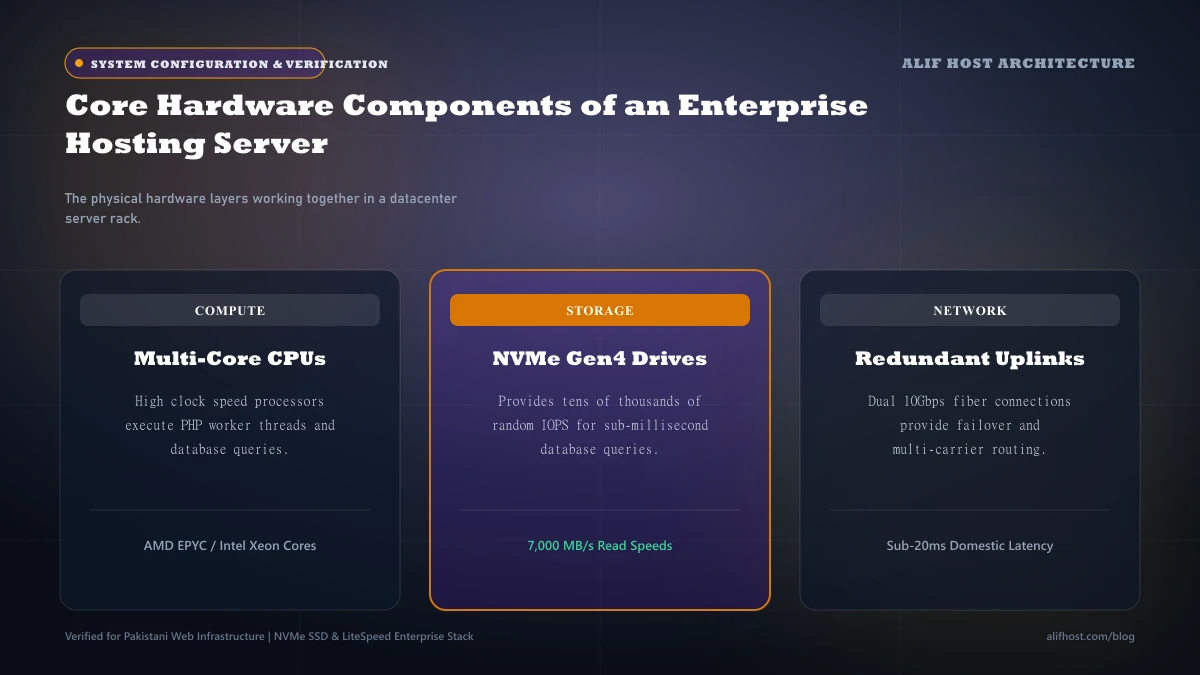
- High-Throughput Connectivity: Servers connect directly to high-speed tier-1 internet backbones via redundant fiber-optic uplinks exceeding 1Gbps to 10Gbps per chassis.
- Continuous Redundant Power: Enterprise data centers utilize uninterruptible power supply (UPS) battery arrays and diesel generators to prevent power interruptions.
- Thermal & Climate Control: Precision HVAC systems regulate humidity and maintain server rack temperatures between 18°C and 22°C to prevent silicon degradation.
- Active Hardware Maintenance: Hot-swappable drives, ECC registered memory modules, and redundant power supplies ensure hardware replacement without taking systems offline.
The HTTP Request Lifecycle: What Happens When a User Enters Your URL
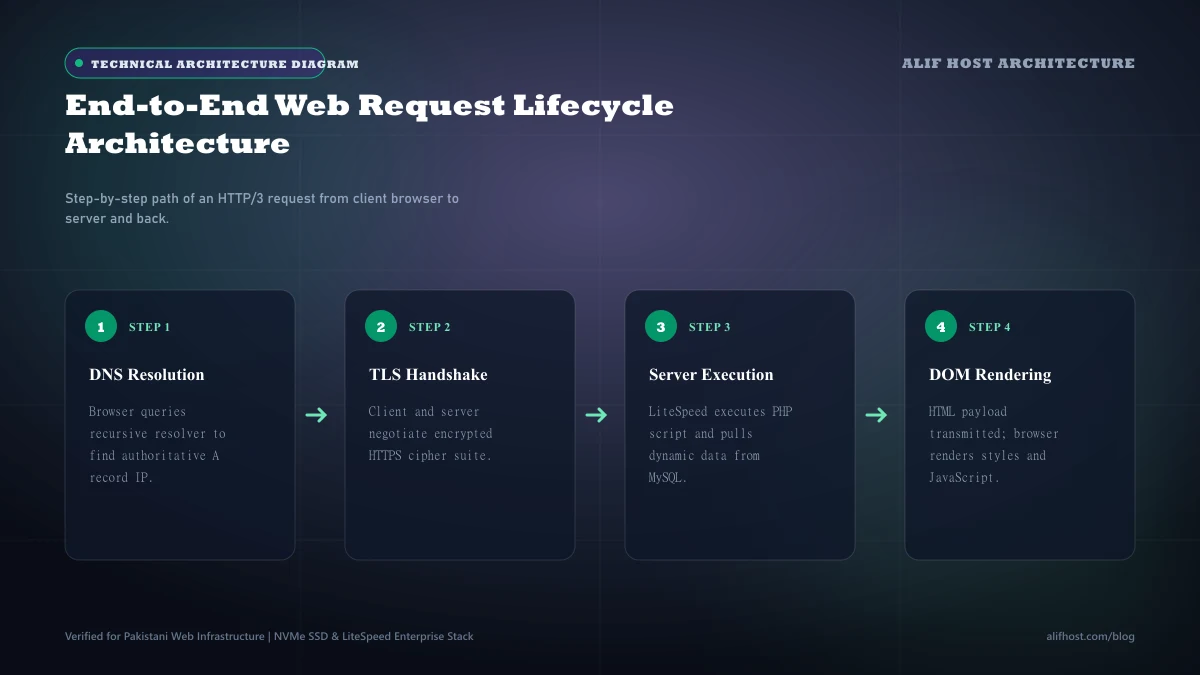
To understand how web hosting functions in practice, let us trace the precise sequence of technical events that transpires in the fraction of a second between a user typing your web address into their browser and the fully rendered page appearing on their mobile screen.
Step 1: The Domain Name System (DNS) Address Resolution
The browser cannot navigate directly using human-friendly alphanumeric names like alifhost.com. It queries a local DNS resolver (such as Google 8.8.8.8 or Cloudflare 1.1.1.1), traverses root and TLD nameservers, and retrieves the hosting server’s authoritative public IPv4 or IPv6 address (e.g., 192.0.2.1). To understand how nameservers and records interact, read our complete guide to DNS records (A, CNAME, MX, TXT) or explore beginner differences in our domain vs web hosting guide.
Step 2: TCP Handshake and TLS / SSL Cryptographic Negotiation
The browser initiates a Transmission Control Protocol (TCP) three-way handshake (SYN, SYN-ACK, ACK) with the server IP on port 443. Next, the client and server exchange cryptographic keys during the TLS handshake to establish an encrypted HTTPS tunnel protecting user data from eavesdropping.
Step 3: Web Server Processing and Backend Execution
The web server daemon (e.g. LiteSpeed) receives the HTTP GET request. If the requested URL is a static image or cached HTML file, it serves it directly from disk cache. If it is a dynamic WordPress page, LiteSpeed passes the request to the PHP-FPM processor, which queries the MySQL database for post content, theme options, and user permissions before compiling a final HTML stream.
Step 4: Browser Rendering and Asset Hydration
The web server sends an HTTP 200 OK status header followed by the compiled HTML. The browser parses the Document Object Model (DOM), identifies linked stylesheets, fonts, and scripts, downloads them via parallel HTTP/2 or HTTP/3 streams, and renders the visual webpage.
What Is a Web Server and How Does It Differ from Web Hosting?
A common point of confusion for beginners and growing businesses is the distinction between a web server and web hosting. While the terms are frequently used interchangeably in informal conversation, they refer to fundamentally different technical layers.
What Is a Web Server?
A web server refers to both physical hardware and specialized server daemon software:
- Hardware Definition: An enterprise computer located in a secure tier-3 or tier-4 data center, connected to high-speed fiber backbones, equipped with multi-core CPUs, ECC RAM, and high-speed NVMe storage.
- Software Definition: The specialized daemon program (such as LiteSpeed, Apache, or NGINX) running on that server. The web server software continuously monitors network ports 80 (HTTP) and 443 (HTTPS), accepts incoming visitor requests from browsers, executes security checks, and serves compiled webpage files.
Web Server vs Web Hosting: The Core Differences
Web hosting is the complete commercial infrastructure service provided by a hosting provider like Alif Host. When you purchase web hosting, you receive an all-inclusive operational environment:
- Server Hardware & Resources: Dedicated or partitioned CPU cores, physical RAM, and fast NVMe solid-state storage.
- Optimized Web Server Software: Pre-configured LiteSpeed Web Server with native LSCache acceleration.
- Control Panel: Intuitive web interfaces like cPanel or WHM to manage files, MySQL databases, domains, and PHP versions without terminal commands.
- Security & Firewalls: Built-in ModSecurity Web Application Firewall (WAF), automated SSL certificates, and DDoS protection.
- Email & Domain DNS: Professional custom domain email inboxes (IMAP/SMTP) and authoritative DNS zone management.
- Technical Support: 24/7 customer support (technical team 11 AM to 8 PM PKT) to troubleshoot errors and assist with website migrations.
In essence: A web server is the physical and software engine that delivers web pages, whereas web hosting is the comprehensive service that provides, powers, secures, and maintains that engine for your online venture.
- Web Server = The software daemon (LiteSpeed/Apache/NGINX) and physical hardware machine serving network requests.
- Web Hosting = The full hosting service package providing server resources, cPanel, security, email, DNS, and technical support.
- At Alif Host, all web hosting plans include enterprise LiteSpeed Web Servers optimized for speed and WordPress caching.
Comparison: The Four Primary Web Hosting Architectures
Different websites have vastly different technical demands. Review how the major hosting models compare in terms of resource isolation and scalability.
| Hosting Model | Resource Allocation | Administrative Access | Best Suited For | Cost Profile |
|---|---|---|---|---|
| Shared Hosting | Communal server with LVE isolation | cPanel management (No root SSH) | Blogs, small businesses, startups | Highly economical (Shared Hosting) |
| WordPress Hosting | Optimized LiteSpeed & PHP caching | cPanel management (No root SSH) | WordPress content & WooCommerce | Cost-effective (WordPress Hosting) |
| VPS Hosting | Dedicated virtual KVM compute slice | Dedicated SSH terminal access | Growing web apps, high traffic, custom daemons | Performance investment (VPS Hosting) |
| Cloud Hosting | Multi-node clustered network with failover | Dedicated SSH or managed cPanel | E-commerce, mission-critical SaaS, enterprises | Scalable utility pricing |
Key Hardware Components Inside a Commercial Hosting Server
When evaluating hosting providers, look beyond promotional marketing slogans to inspect the actual silicon powering your websites.
- Central Processing Unit (CPU): Multi-core high-performance processors execute PHP compilation, database queries, and encryption calculations.
- Random Access Memory (RAM): High-frequency DDR4 or DDR5 ECC (Error-Correcting Code) RAM stores active web worker threads and in-memory caches like Redis and Memcached.
- Solid-State Drive Storage (NVMe): Non-Volatile Memory Express drives connected over PCIe deliver 3,000+ MB/s read/write speeds, ensuring instantaneous database operations.
- Network Interface Cards (NIC): Redundant 10Gbps or 25Gbps network controllers handle concurrent inbound visitor streams without packet queuing.
Data Center Tiers and Infrastructure Redundancy Standards
Enterprise hosting providers deploy servers inside certified commercial data centers classified under the Uptime Institute’s Tier Standard (Tier I through Tier IV).
- Tier I & II Data Centers: Single path for power and cooling with expected annual downtime between 22 to 28 hours.
- Tier III Facilities (Enterprise Standard): Concurrently maintainable infrastructure with dual power feeds, redundant diesel generators (N+1 redundancy), and 99.982% uptime SLA.
- Tier IV Facilities: Fault-tolerant infrastructure with fully compartmentalized independent systems (2N+1 redundancy) with 99.995% uptime SLA.
HTTP Status Codes Decoded: Diagnosing Web Hosting Health
Understanding standard HTTP response status codes allows you to immediately diagnose communication issues between your visitors and your server:
- 200 OK: The web server successfully located and transmitted the requested webpage asset.
- 301 Moved Permanently: An automated redirection instruction forwarding visitors and search bots to a new canonical URL.
- 403 Forbidden: The web server recognized the request but refused access due to file permission locks or firewall blocks.
- 404 Not Found: The browser requested a resource or file that does not exist at the specified server path.
- 500 Internal Server Error: A generic backend crash caused by PHP fatal syntax errors, exhausted memory, or corrupted
.htaccessdirectives. - 503 Service Unavailable: The server is temporarily overloaded or undergoing maintenance, frequently triggered when CloudLinux LVE limits are breached.