


Defining the Scope of Responsibility: Who Maintains the Software Stack?
In short: Managed vs shared hosting is about who looks after the server: on shared hosting you manage your own site inside cPanel, while managed hosting adds expert help with updates, security, backups and speed tuning, usually at a higher price.
When evaluating web hosting tiers, buyers frequently conflate hardware performance specifications with the scope of operational support. The distinction between unmanaged shared hosting and fully managed hosting is not merely about server CPU speed; it is fundamentally about the division of technical labor. In standard shared hosting, the provider guarantees server hardware uptime and network connectivity, but you are solely responsible for debugging CMS application crashes, updating plugins, optimizing database tables, and resolving security infections. In managed hosting, certified systems engineers actively maintain your application ecosystem.
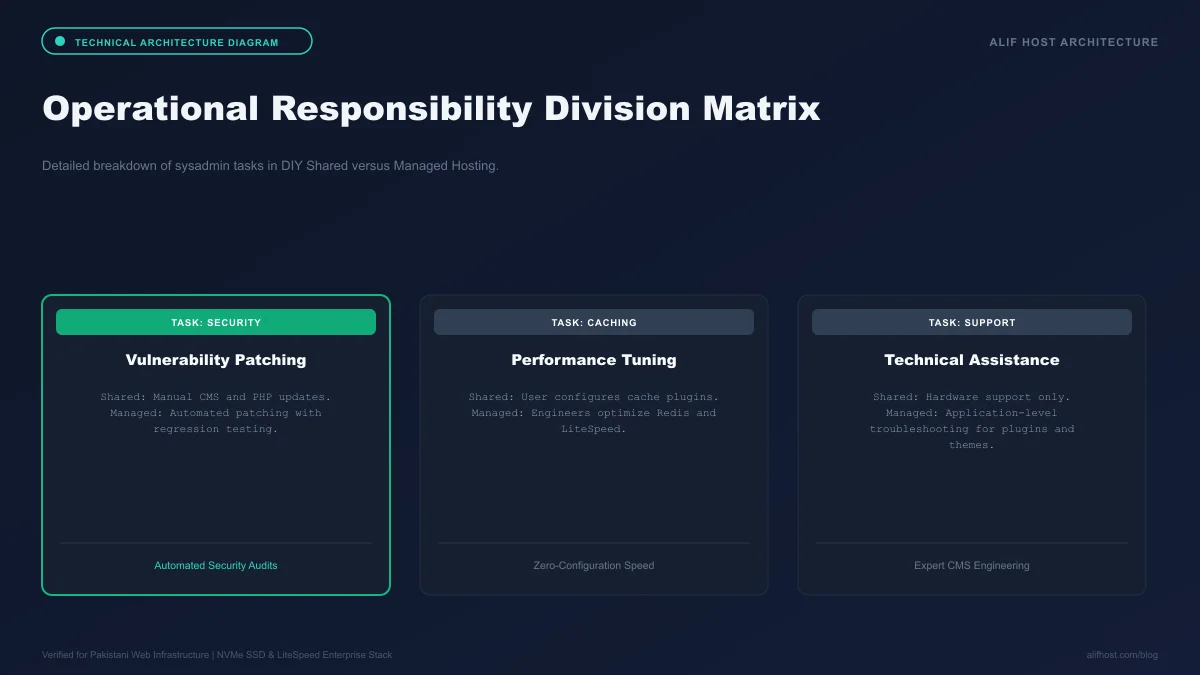
- Shared DIY Hosting: The provider provides cPanel and hardware; the client manages software updates, PHP extensions, CMS configuration, and database maintenance.
- Managed Hosting: The provider proactively manages operating system updates, core CMS patches, automated staging sandboxes, server-level caching, and 24/7 malware remediation.
- Support Scope: Standard support assists with hosting account issues; managed support assists with application performance tuning, slow database queries, and migration debugging.
Core Operational Pillars Included in Managed Hosting Services
Review the specialized engineering features that distinguish a genuine managed hosting platform from standard multi-tenant hosting.
1. Automated Staging Sandboxes and Safe Deployments
Managed platforms provide one-click staging environments. Developers can clone a live production website to a private testing subdomain, test PHP version upgrades, install new plugins, or redesign templates without risking live customer checkout flows.
2. Proactive Security Monitoring and Real-Time Patching
Rather than leaving site owners to clean hacked files after an intrusion, managed platforms run automated web application firewalls with virtual patching that blocks zero-day exploits before third-party developers even publish official security updates.
3. Server-Level Application Optimization
Managed hosting fine-tunes server parameters (such as max_execution_time, memory_limit, OPcache byte-code allocation, and Redis object caching) specifically tailored to the exact CMS framework executing on the account.
Comparison Matrix: Shared Hosting vs Managed Hosting
Review the operational differences between standard shared hosting and a fully managed hosting tier.
| Operational Capability | Standard Shared Hosting | Fully Managed Hosting |
|---|---|---|
| Core CMS & Plugin Updates | Client must manually test and apply | Automated safe testing with rollback |
| Staging Environments | Manual database cloning required | One-click staging sandbox included |
| Object Caching | Standard filesystem caching | In-memory Redis / Memcached pre-configured |
| Malware Removal | Automated quarantine or user cleanup | Free expert security team cleanup |
| Performance Tuning | Generic server configuration | Custom PHP and database query profiling |
| Target Audience | Budget-conscious sites, hobbyists, developers | Businesses, agencies, mission-critical sites |
Total Cost of Ownership (TCO): Time vs Monetary Investment
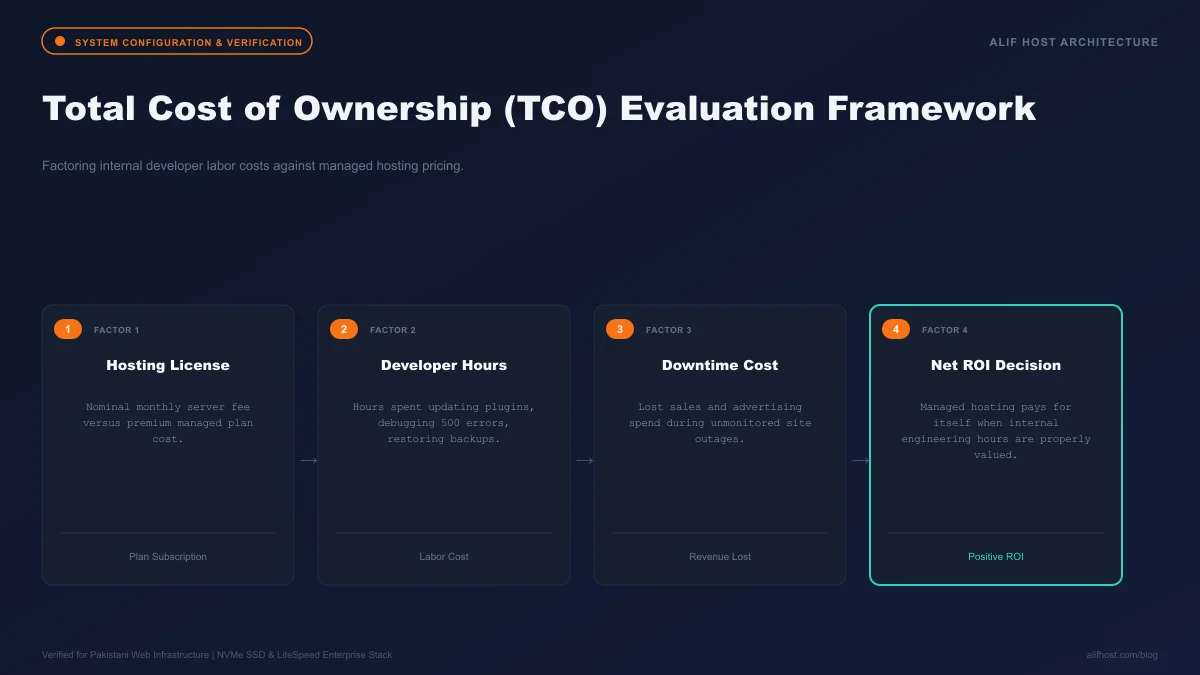
While shared hosting is undeniably an accessible option in upfront subscription costs, businesses must also calculate the value of engineering and administrative time. If an internal team member spends hours troubleshooting server limits or optimizing database queries, upgrading to managed or scalable tiers delivers clear operational savings.
- Calculate Hourly Time: If an engineer spends 4 hours recovering from an unpatched plugin exploit, that downtime costs thousands in lost productivity.
- Eliminate Expensive Third-Party Security Plugins: Managed hosting includes enterprise firewalls and malware scanners, eliminating recurring software subscription fees.
- Focus on Revenue Activities: Offloading server maintenance allows founders to focus on product development, customer acquisition, and marketing.
Performance Profiling: Slow Query Logs, APM Tools, and OPcache Tuning
On managed infrastructure, engineering teams actively inspect backend execution metrics to eliminate hidden bottlenecks before they degrade customer experience:
- MySQL Slow Query Analysis: Profiling queries exceeding 1 second to identify missing database indexes or unoptimized table joins.
- PHP OPcache Optimization: Precompiling PHP script bytecode directly into shared server memory, reducing CPU overhead on repetitive page rendering.
- Application Performance Monitoring (APM): Identifying slow external API calls, slow payment gateway webhooks, or sluggish plugin hooks.
Agency Workflows: How Managed Hosting Empowers Web Agencies
For digital agencies and web design studios delivering websites to commercial clients, managed hosting transforms infrastructure from a liability into a high-margin service offering. With automated staging clones, Git version control push-to-deploy pipelines, and white-label client billing, agencies can maintain hundreds of client portals reliably.
Proactive Zero-Day Defense: Virtual Patching at the Web Application Firewall Layer
One of the most valuable aspects of managed hosting is automated virtual patching. When critical zero-day vulnerabilities are disclosed in popular plugins (such as WooCommerce, Elementor, or Gravity Forms), vendor-supplied patches often take days or weeks to test and deploy across multiple sites. On our managed infrastructure, security engineers deploy immediate ModSecurity WAF rules within hours of disclosure, inspecting and filtering exploit signatures before they can reach the WordPress application layer.
- Immediate Vulnerability Neutralization: Eliminates the window of exposure between vulnerability disclosure and official developer plugin releases.
- Zero Core Code Modification: Virtual patches operate at the web server reverse proxy level without altering your PHP files or database.
- Comprehensive Audit Logging: Every blocked malicious payload is logged with originating IP, attack vector signature, and geolocation for forensic review.
Cost-Benefit Calculation: ROI of Delegating Server Administration
Calculate the true financial return on investment of upgrading from unmanaged DIY hosting to fully managed cloud hosting:
- Quantify Internal Engineering Hours: Reclaim 10 to 20 hours of monthly developer time previously spent on updates, server patches, and security scans.
- Eliminate Expensive Third-Party Subscriptions: Avoid paying for external backup plugins, security firewalls, and staging platforms.
- Maximize Organic Search Conversions: Fast TTFB and high availability directly translate to improved user experience and lower bounce rates.