


The Real Estate Analogy: Street Address vs Physical House
In short: Domain vs hosting: a domain is your website's address (like yourbrand.com), and hosting is the server space where the website files and emails are stored. You need both, and you connect them by pointing the domain's nameservers to your hosting.
For individuals and business owners establishing their first online presence, the terminology surrounding internet infrastructure frequently causes confusion. People often ask: "If I buy a domain name, do I automatically have a website?" or "Why do I need to pay for both a domain and web hosting?" To understand the relationship clearly, consider the classic residential real estate analogy. Your domain name is your registered street address, such as "123 Commercial Avenue, Lahore". Your web hosting is the physical plot of land and concrete house built at that address where your furniture, belongings, and inventory are stored.
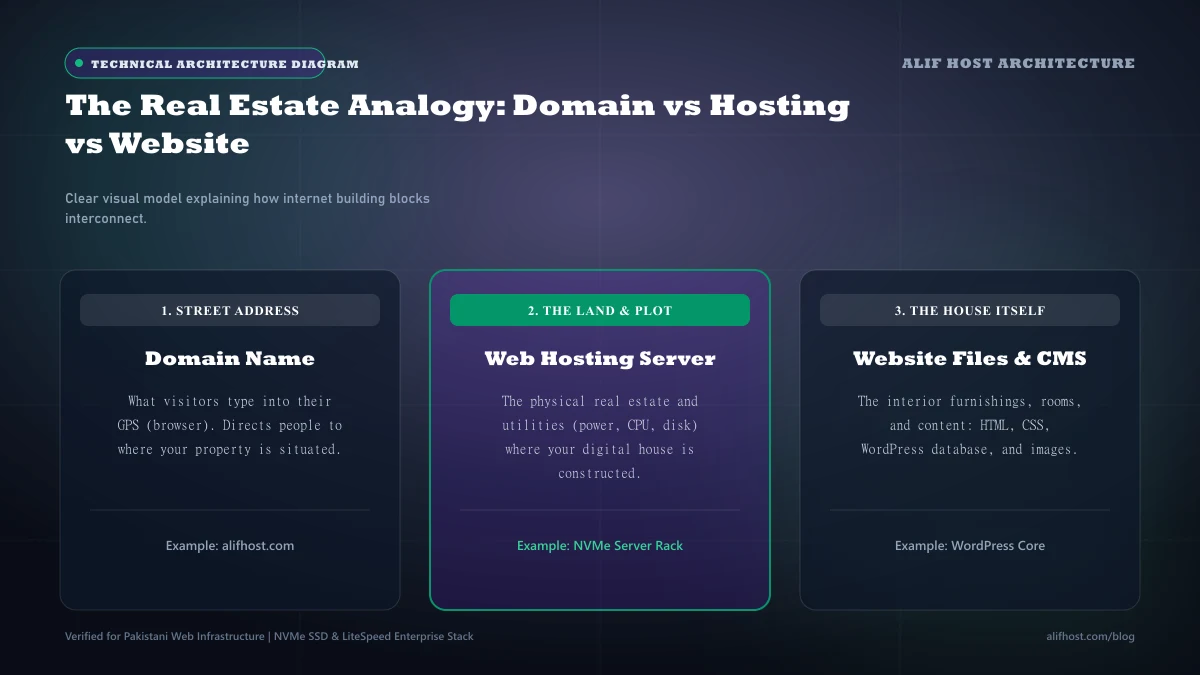
- A Domain Without Hosting: An address pointing to an empty lot. Visitors can type the URL into their browser, but they will see a placeholder page because no website files exist to display.
- Hosting Without a Domain: A fully built house without a registered street address or sign. The website files exist on a server, but visitors can only reach it by typing an obscure numerical IP address like
192.0.2.45. - Domain + Hosting Together: A complete, functional digital storefront. The domain routes visitors smoothly to the server hardware, which immediately delivers the web pages.
What Exactly Is a Domain Name?
Computers communicate across the internet using numerical Internet Protocol (IP) addresses. Remembering sequences like 172.217.16.206 for every website would be impossible for human users. The Domain Name System (DNS) was engineered as the internet’s global telephone directory, translating human-friendly names into machine-readable IP coordinates.
Anatomy of a Domain Name
In https://www.alifhost.com, the domain consists of distinct components: the top-level domain (TLD) which is .com, the second-level domain (SLD) which is alifhost, and the subdomain www. Each segment is managed under strict international registry standards.
Domain Registries vs Accredited Registrars
Global registries (like Verisign for .com or PKNIC for .pk) maintain the master database of domain ownership. Domain service providers like Alif Host provide the customer management interface allowing businesses to register, renew, and manage DNS settings for their domains. In Pakistan, .pk domains (including .com.pk, .org.pk, and .net.pk) are administered under PKNIC policies, which require mandatory two-year registration cycles, whereas international domains like .com can be registered annually. You can register both directly on our domain registration page.
Comparison: Domain Name vs Web Hosting Specifications
Review the structural differences between domain registration and web hosting services in the comparative breakdown below.
| Attribute | Domain Name | Web Hosting |
|---|---|---|
| Primary Function | Digital address / identity | Physical server storage and compute execution |
| Governing Standards | ICANN and national registries (PKNIC) | Data center hardware and operating systems |
| Renewal Cycles | 1 to 10 years (Mandatory 2 years for .pk) | Monthly, annually, or multi-year terms |
| Storage Capacity | Zero storage (Contains DNS pointers only) | 5 GB to 100+ GB NVMe storage space |
| Impact on Speed | Negligible (Only influences initial DNS lookup) | Massive (Governs TTFB, CPU, RAM, and load time) |
| Transferability | Can transfer to any accredited registrar | Can migrate files to any compatible web host |
| Pricing Model | Fixed annual registry fee (~PKR 2,500 to 5,000/yr) | Recurring resource fee (Shared Hosting) |
The Bridge Between Them: How Domain Name System (DNS) Connects the Two
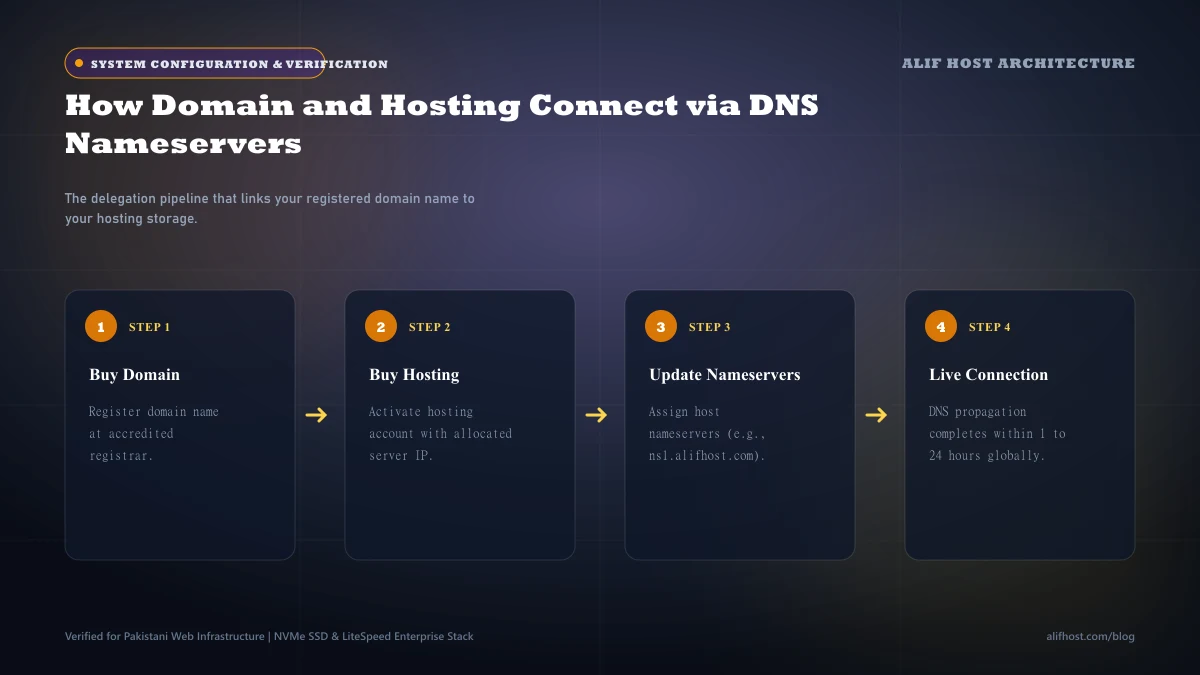
How does your domain know which web hosting server holds your files? The connection is established through Authoritative DNS Nameservers. When you purchase hosting, your provider assigns nameservers (such as ns1.alifhost.com and ns2.alifhost.com). You input these nameservers into your domain registrar dashboard. When a visitor requests your URL, global DNS resolvers query those nameservers to fetch your server’s A record (IP address), directly connecting the address with the physical hardware.
The Complete Web Stack: Domain, DNS, Web Server, Database, and SSL
To visualize how the entire modern web hosting ecosystem operates in unison, review how these five core components interact:
- Domain Name: The branded entryway that visitors type into their navigation bar.
- DNS Zone Records: The routing directory specifying where web traffic (A record) and email traffic (MX record) travel.
- Web Server (LiteSpeed / Apache): The processing engine that listens for requests and serves HTML, images, and stylesheets.
- MySQL Database: The secure structured storage holding all post content, customer profiles, and product catalogs.
- SSL Certificate: The cryptographic encryption layer guaranteeing end-to-end privacy between the visitor’s device and the server.
Email Hosting vs Web Hosting: Why Separating Them Enhances Deliverability
Many businesses initially run both their website and their business emails (info@brand.com) on the same shared web server. While convenient, high-volume transactional emails can sometimes be impacted by shared IP reputations. Separating your mission-critical corporate communications onto a dedicated Business Email Hosting infrastructure improves inbox deliverability with dedicated SPF, DKIM, and DMARC enforcement.
New Webmaster Roadmap: 5 Steps from Domain Registration to Launch
Follow this sequential roadmap to successfully launch your digital brand after securing your domain and web hosting:
- Step 1: Point Authoritative Nameservers: Connect your domain to your hosting server via
ns1.alifhost.comandns2.alifhost.com. - Step 2: Issue Free SSL Encryption: Enable AutoSSL in cPanel to ensure secure HTTPS connections from day one.
- Step 3: Provision Professional Mailboxes: Configure your branded business email addresses for team communications.
- Step 4: Install Your Preferred CMS: Deploy WordPress, WooCommerce, or Laravel using our 1-click Softaculous installer.
- Step 5: Submit Sitemap to Google: Register your domain in Google Search Console to index your pages in search results.