

The Caching Landscape: Edge CDN vs Origin Server Acceleration
In short: Cloudflare Free vs Pro vs LiteSpeed Cache: Cloudflare's CDN speeds up static files and adds protection, while LiteSpeed Cache speeds up the WordPress pages themselves on the server. For most sites the best setup is LiteSpeed Cache plus Cloudflare Free.
Across web design forums, Facebook groups, and developer communities in Pakistan, a ubiquitous recommendation given to any website owner experiencing slow speeds is: "Bas Cloudflare laga lo, site fast ho jayegi" (Just install Cloudflare and your site will become fast).
While Cloudflare is arguably the world's most sophisticated cloud security, reverse proxy, and edge network, treating it as an automatic cure-all for web hosting performance reveals a fundamental misunderstanding of web architecture.
To build a blazing-fast, secure web application in 2026 on modern web hosting, website owners must recognize the critical architectural distinction between:
- Edge Caching (Cloudflare): Serving static assets (images, CSS, JS) from reverse-proxy edge data centers distributed globally.
- Origin Server-Level Caching (LiteSpeed / LSCache): Accelerating dynamic PHP code execution, assembling HTML pages in memory, and caching MySQL database queries directly at the origin web server.
Under certain routing conditions (especially in South Asia) misconfigured Cloudflare proxying can actually increase Time to First Byte (TTFB) and slow down your website for local Pakistani visitors!
In this architectural breakdown, we analyze Cloudflare Free, Cloudflare Pro ($20/month), and native LiteSpeed server caching, providing you with the definitive blueprint to configure the ultimate hybrid performance stack.
LiteSpeed Cache is built into every Alif Host WordPress hosting plan.
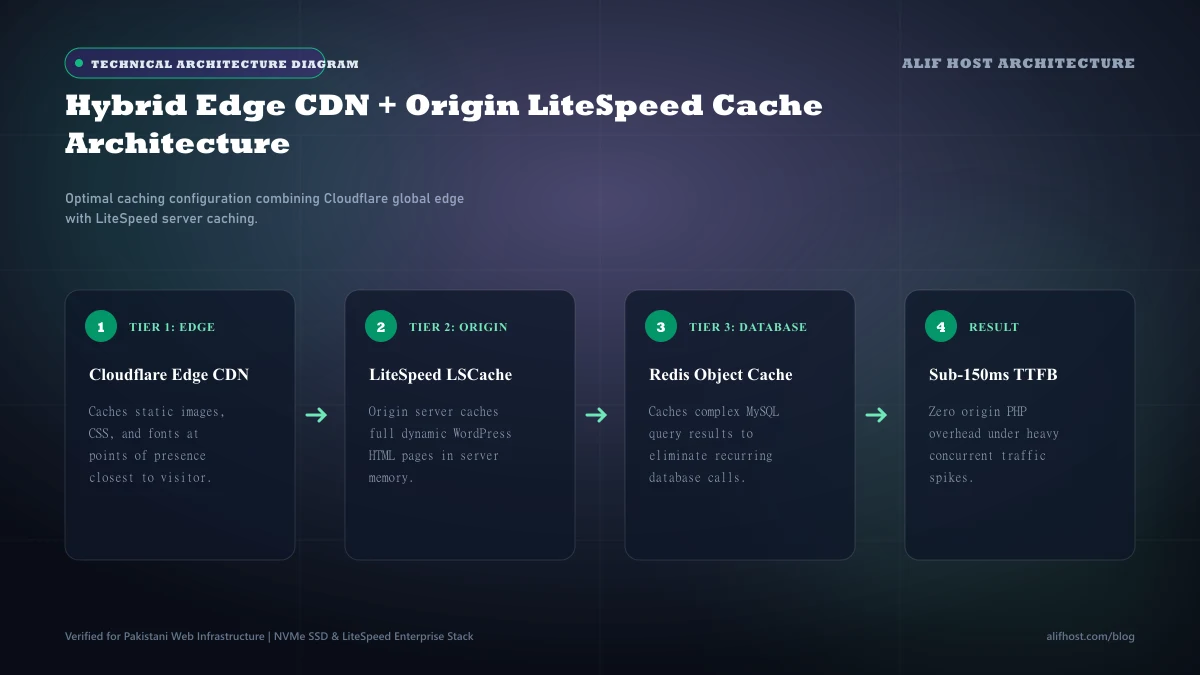
- Edge Caching vs Origin Caching: Cloudflare caches static files across 300+ global edge cities; LiteSpeed caches dynamic PHP HTML output directly in server RAM.
- The Latency Paradox: On Cloudflare Free, Pakistani traffic is occasionally routed to overseas data centers (e.g., Muscat or Europe) during peak transit times, inflating local TTFB.
- Dynamic Bypass: Personalized shopping carts, user dashboards, and checkout pages automatically bypass Cloudflare's edge cache and must execute at the origin server.
- The Hybrid Solution: Combining Cloudflare's authoritative DNS and DDoS mitigation with LiteSpeed's server-level LSCache delivers the highest possible performance and security score.
The Cloudflare Latency Paradox in Pakistan: When CDNs Add Latency
Why does enabling Cloudflare's orange cloud (proxy mode) sometimes make a website feel slower for visitors inside Pakistan?
To understand this phenomenon, you must examine how internet traffic routes through reverse proxies:
- Direct Connection: A visitor in Lahore requests your website hosted on an Alif Host server in the region. The visitor's ISP (e.g., Nayatel) routes packets directly to the server with a 25ms to 45ms round-trip ping time.
- Cloudflare Proxied Connection: When Cloudflare is active, the visitor's browser connects to Cloudflare's edge node first. Cloudflare then opens a separate connection back to your origin server to fetch dynamic content, and finally relays the response back to the visitor.
On Cloudflare's Free tier, network traffic from free accounts is routed through cost-optimized, non-premium transit peering agreements. If Cloudflare's edge nodes in Pakistan or UAE experience bandwidth saturation, free tier traffic from Pakistani ISPs is frequently routed to edge nodes in Mumbai, Singapore, or Frankfurt. Instead of a direct 35ms connection, the visitor's request makes a 250ms detour across international submarine cables before even reaching your origin server.
For static assets (images and CSS), this latency penalty is offset by Cloudflare caching the files locally after the first request. But for dynamic PHP requests (such as loading a WordPress homepage or updating a WooCommerce cart), every un-cached request suffers from double network hops.
Cloudflare Free vs Cloudflare Pro ($20/month): What Do You Actually Get?
Many commercial businesses contemplate upgrading from Cloudflare Free to Cloudflare Pro. Here is an objective technical breakdown of what the $20/month per domain investment provides:
| Feature & Capability | Cloudflare Free Tier | Cloudflare Pro Tier ($20/mo) | Native LiteSpeed Cache (Alif Host) |
|---|---|---|---|
| DDoS Attack Mitigation | Unmetered Layer 3/4/7 protection | Enhanced Layer 7 mitigation rules | Web server connection throttling (not full DDoS scrubbing) |
| Web Application Firewall (WAF) | Basic custom rules (up to 5 rules) | Full Managed WAF + OWASP Rule Set | Server-level firewall rules |
| Automated Image Optimization | Not included | Cloudflare Polish (Auto WebP / AVIF) | Available in the LiteSpeed Cache plugin (QUIC.cloud) |
| Mobile Optimization | Not included | Mirage (Virtual screen optimization) | Responsive server-side asset tuning |
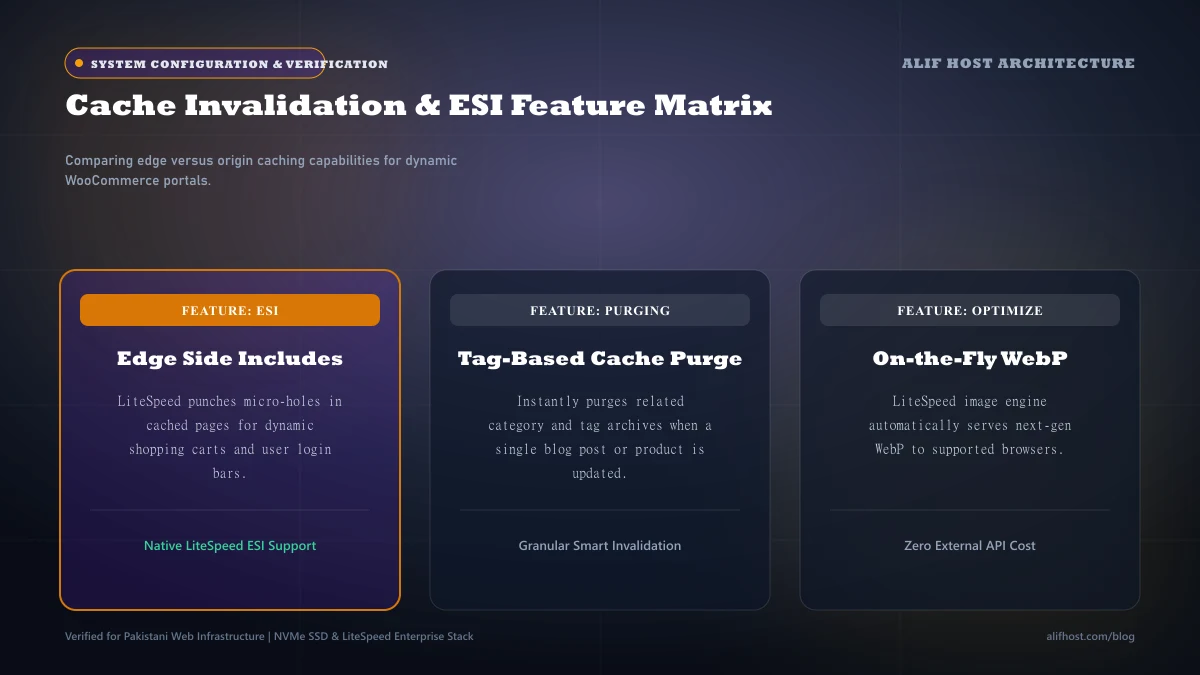
| Dynamic HTML Caching | Requires manual page rule hacks | Optional APO for WordPress ($5/mo) | Native built-in server-level tag caching |
| E-Commerce Cart Purging | Cannot inspect dynamic cart cookies | Requires manual edge worker scripts | Instant automatic tag-based cache purge |
LiteSpeed Server-Level Caching (LSCache): Why Origin Caching Wins for Dynamic Sites
Unlike generic caching plugins (like WP Super Cache or W3 Total Cache) that rely on slow PHP execution to serve cached files, LiteSpeed Cache (LSCache) is implemented directly inside the web server binary kernel.
When a page is cached by LiteSpeed:
- Incoming requests are intercepted at the web server socket layer before PHP or MySQL are even initialized.
- LiteSpeed serves the pre-compiled HTML directly from server RAM in 10 to 25 milliseconds, achieving thousands of requests per second.
- Smart Tag-Based Invalidation: When you publish a new blog post, update a product price in WooCommerce, or approve a comment, LSCache purges only the specific related category and tag pages instantly. It does not purge your entire sitewide cache, ensuring high cache hit ratios 24/7.
- Private Caching for Logged-In Users: LiteSpeed can maintain isolated private caches for logged-in members, allowing dynamic membership portals to enjoy fast loading speeds without leaking private customer data.
The Definitive 2026 Hybrid Architecture Blueprint
To achieve maximum velocity, enterprise security, and 100% Core Web Vitals compliance, the optimal production architecture combines both technologies in a synchronized hybrid pipeline:
1. Use Cloudflare for Authoritative DNS (Grey-Cloud or Orange-Cloud)
Cloudflare operates the world's fastest authoritative Anycast DNS network (1.1.1.1). Point your domain nameservers to Cloudflare. If your target audience is predominantly in Pakistan, keep dynamic root domains on DNS-only mode (Grey Cloud) to keep direct, low-latency routing to your Alif Host server, while routing media or static subdomains through Cloudflare (Orange Cloud) for global asset distribution.
2. Deploy LiteSpeed Cache on the Origin Server
Install the official LiteSpeed Cache plugin in WordPress. Enable:
- Page Caching with a 7-day TTL.
- Redis Object Caching for in-memory database acceleration.
- CSS/JS Minification and Critical CSS Generation.
- Native WebP Image Replacement using LiteSpeed's free QUIC.cloud API.
3. Synchronize Cloudflare API with LSCache
In the LiteSpeed Cache plugin settings under CDN, input your Cloudflare Account Global API Key or API Token and Zone ID. When you publish content or clear your cache in WordPress, LiteSpeed will automatically dispatch an API purge webhook to Cloudflare's global edge network simultaneously, ensuring zero stale cache across the world!