


The Modern Cyber Threat Landscape: Automated Botnets and Script Attacks
In short: A website security checklist covers the basics most hacks exploit: SSL on every page, updated software and plugins, strong passwords with two-factor login, a firewall, regular off-site backups and limited user access. The 12 steps below explain each one.
A pervasive myth among small business owners is the belief that cybercriminals only target major multinational banks or government institutions. In reality, modern cyberattacks are overwhelmingly executed by automated vulnerability scanners and distributed botnets sweeping IP ranges for known software flaws, unpatched plugins, exposed database configurations, and weak passwords. If your website is accessible on the internet, it is continuously subjected to reconnaissance scans regardless of your company’s size or traffic volume.
- Credential Stuffing & Brute-Force: Automated scripts bombarding login portals with millions of leaked username and password combinations.
- SQL Injection (SQLi): Malicious database queries injected through vulnerable contact form fields or search parameters to extract user records.
- Cross-Site Scripting (XSS): Injecting unauthorized JavaScript into pages to steal administrator session cookies or redirect visitors to malicious landing pages.
- Arbitrary File Upload: Uploading concealed PHP backdoors masquerading as image files to gain unauthorized server shell access.
Server and Transport-Layer Hardening Controls
Your underlying server hosting environment provides the foundational perimeter defending your application data.
1. Enforce HTTPS with Modern TLS 1.3 Ciphers
Never allow unencrypted HTTP traffic. Deploy an active SSL certificate across all domains and subdomains. Enforce an HTTP Strict Transport Security (HSTS) header to mandate that browsers connect exclusively via encrypted channels, rendering man-in-the-middle packet sniffing obsolete.
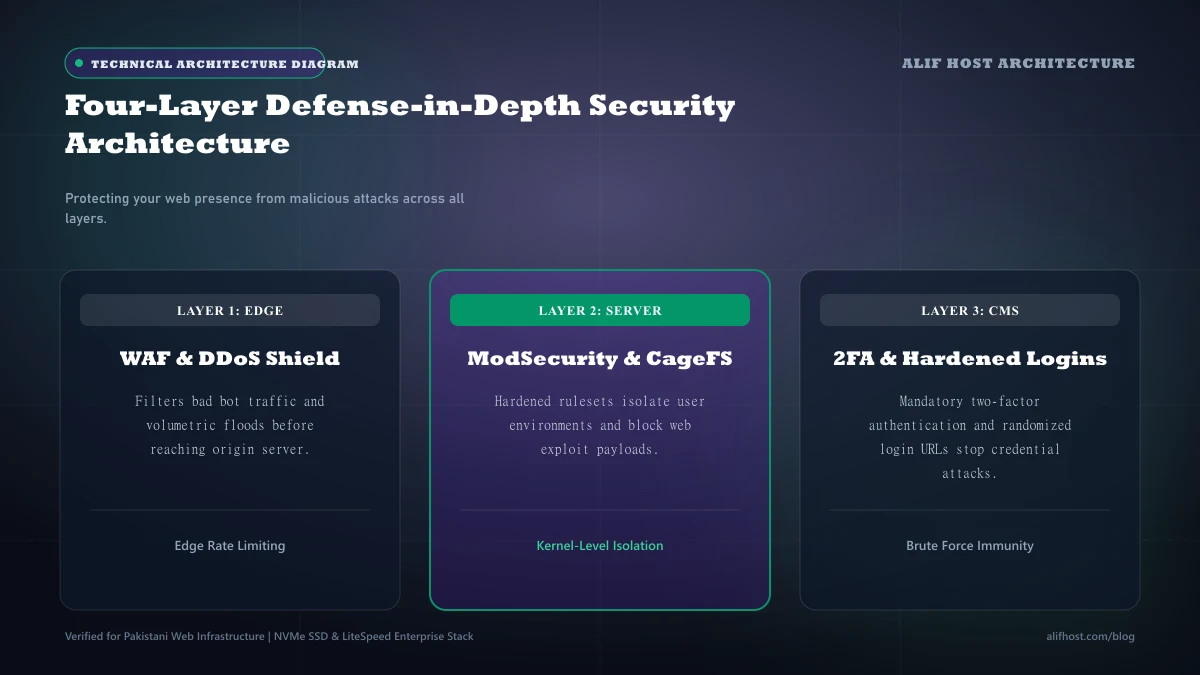
2. Web Application Firewall (WAF) and ModSecurity Inspection
Deploy a Web Application Firewall that intercepts incoming HTTP requests before they reach your CMS code. ModSecurity with the OWASP Core Rule Set inspects payload parameters, immediately blocking requests containing known SQL injection or directory traversal patterns.
3. Operating System Account Isolation (CloudLinux CageFS)
Ensure your web host deploys CageFS virtualized file system encapsulation. CageFS traps each cPanel account inside its own virtualized container, making it impossible for a compromised neighbor account to read your configuration files, source code, or database passwords.
Comparison: Security Posture Assessment Matrix
Evaluate your current website defenses against these industry-standard security benchmarks.
| Security Domain | Basic Vulnerable Posture | Hardened Production Standard | Risk Level if Ignored |
|---|---|---|---|
| SSL / Transport | Unencrypted HTTP or mixed content | Enforced TLS 1.3 with HSTS header | Critical (Data interception) |
| Administrative Access | Single-factor admin/admin credentials | Unique username + 2FA TOTP authentication | Critical (Account takeover) |
| File Permissions | Global 777 read/write/execute | Files 644, Directories 755, wp-config 600 | High (Arbitrary code injection) |
| Database Security | Default table prefixes (wp_) | Custom prefix + dedicated DB user per app | Medium (SQL injection targeting) |
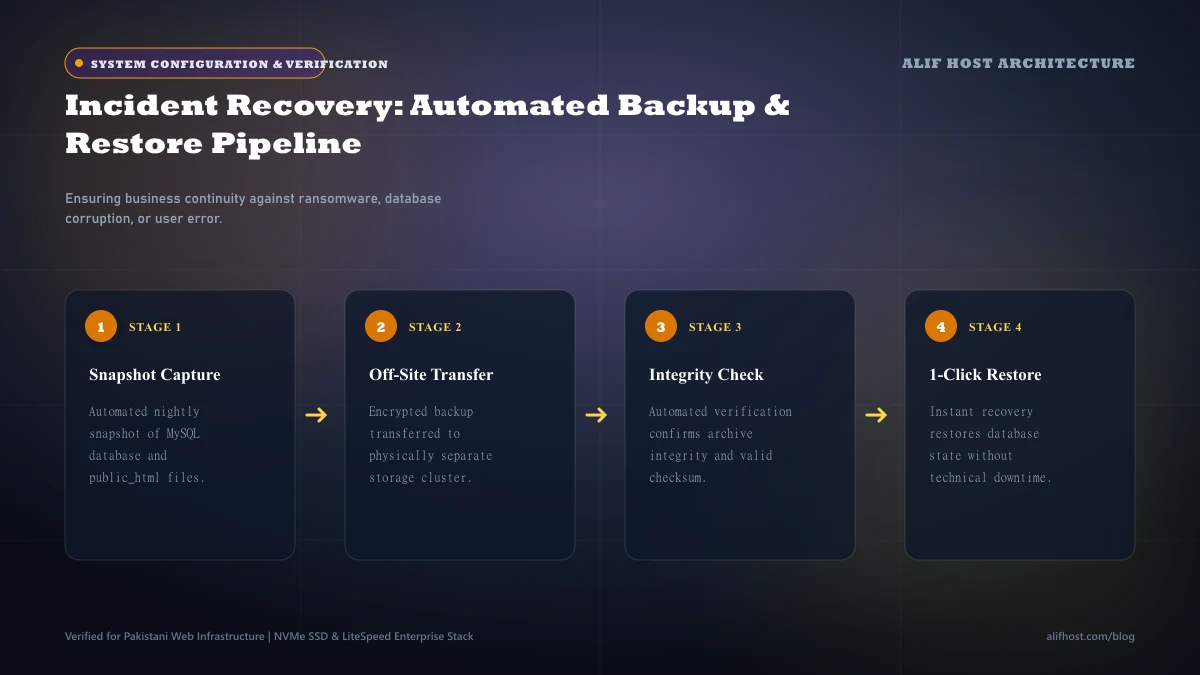
| Backup Frequency | Manual ad-hoc copies once a year | Automated daily snapshots + off-site replicas | Critical (Total data loss) |
Application-Layer Hardening: The WordPress Defense Protocol
Because WordPress powers over 40% of the world’s websites, it represents the primary target of malicious automated scanning scripts. Implement these specific application-layer configurations immediately.
- Change Default "admin" Usernames: Never retain the default administrator username. Create a unique username and assign a complex 20+ character passphrase.
- Mandate Two-Factor Authentication (2FA): Require all administrative and editorial accounts to provide a time-based one-time password (TOTP) from an authenticator app.
- Disable XML-RPC (
xmlrpc.php): Unless you actively use the WordPress mobile app or Jetpack, disable XML-RPC via.htaccessto stop amplification brute-force attacks. - Disable File Editing in Dashboard: Add
define('DISALLOW_FILE_EDIT', true);inwp-config.phpso compromised admin credentials cannot be used to edit PHP files directly. - Limit Login Attempts: Deploy fail2ban or a security plugin that locks out IP addresses after five consecutive failed authentication attempts.
Database Hardening: Protecting Your Application Data Store
The MySQL database stores every customer record, transaction history, and hashed administrator credential. Hardening the database layer prevents SQL injection catastrophes.
- Alter Default Table Prefix: Change the default
wp_table prefix to a randomized string (e.g.alh7_) during initial installation. - Principle of Least Privilege: Ensure your database user is granted only essential privileges (
SELECT,INSERT,UPDATE,DELETE,CREATE,DROP,ALTER) and lacks global administrative grants. - Bind Database to Localhost: Never expose port 3306 to public internet interfaces unless strictly restricted to specific static developer IPs via firewall rules.
Post-Infection Emergency Incident Response: 5 Critical Steps
If your website exhibits signs of compromise, malicious redirects, or unexpected admin accounts, execute this emergency triage protocol immediately:
- Step 1: Isolate the Site: Place the website in maintenance mode and rotate all database passwords, cPanel passwords, and FTP credentials immediately.
- Step 2: Scan Filesystem for Web Shells: Run a deep cPanel Imunify360 or ClamAV malware scan to quarantine obfuscated base64 PHP backdoors.
- Step 3: Reinstall Core CMS Files: Download a fresh archive of WordPress core and replace
/wp-admin/and/wp-includes/directories entirely. - Step 4: Audit Administrator Users: Check the
wp_usersdatabase table directly via phpMyAdmin and delete any unauthorized accounts. - Step 5: Restore from Clean Off-Site Backup: If infection is deep or widespread, restore from a verified clean daily snapshot captured before the breach date.
Quarterly Security Maintenance Protocol for Production Webmasters
Establish a disciplined quarterly maintenance cadence to guarantee that your security perimeter remains resilient against newly discovered vulnerabilities:
- Rotate Database and Administrative Passphrases: Generate new 24+ character alphanumeric passphrases for cPanel, MySQL, and CMS admin users.
- Audit Active Plugins and Extensions: Permanently delete inactive plugins, themes, and outdated database tables that expand your attack surface.
- Verify Off-Site Backup Recoverability: Perform a test restoration in a private staging sandbox to verify that backup archives are uncorrupted.
- Inspect Google Search Console Security Alerts: Check the "Security & Manual Actions" tab for malware flags, hacked URL injections, or spam warnings.