


The Growing Threat of Digital Brand Impersonation and Cybersquatting
In short: Domain name brand protection means registering your main domain plus its common variations and extensions, keeping renewals on auto-pay, locking the domain at your registrar and watching for look-alike domains used for fraud (cybersquatting).
Your company name and trademarks represent your most valuable commercial assets. In the digital economy, malicious actors frequently exploit brand recognition through deceptive domain registration practices. Cybersquatting, defined as the bad-faith registration of trademarks in domain names, remains a pervasive threat across both global extensions like .com and regional namespaces like .pk. When an impostor controls a domain resembling your brand, they can execute targeted credential phishing, intercept confidential corporate emails, sell counterfeit goods, or demand extortionate ransom payments for domain transfers.
- Cybersquatting: Bad-faith registration of identical brand names with intent to resell at inflated prices or divert legitimate web traffic.
- Typosquatting (URL Hijacking): Registering common spelling mistakes, transposed letters, or phonetic equivalents (e.g. yourbrnd.com or your-brand.com).
- Combo-squatting: Appending commercial terms such as "login", "support", "billing", or "portal" to brand names to craft deceptive phishing portals.
- Homograph Attacks: Substituting Cyrillic or Greek characters that look visually identical to Latin letters within Internationalized Domain Names (IDNs).
Core Defensive Registration Strategy: Which Extensions Should You Own?
While registering every available global top-level extension is economically impractical for most businesses, organizations must secure a strategic protective perimeter around their primary digital trademark.
1. Primary Generic and Country-Code Extensions
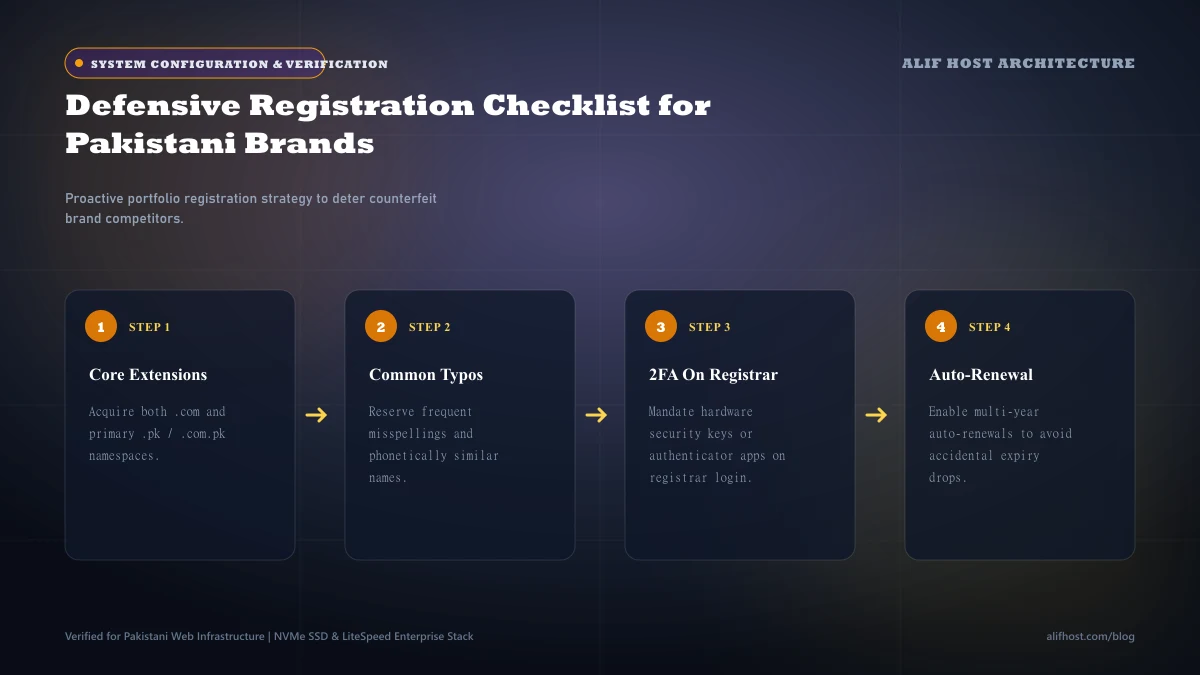
At minimum, companies operating in Pakistan should own the .com global standard and the .pk / .com.pk national registries. Even if your primary customer-facing portal runs on .com, controlling .pk guarantees that local competitors cannot establish confusion in domestic search results.
- Global Baseline: Secure
.com,.net, and.orgif non-profit or community initiatives are anticipated. - Domestic Territorial Roots: Secure
.pkand.com.pkto protect your national trademark rights. - Regional Expansion: If you plan commerce in the GCC, evaluate
.ae(UAE) and.sa(Saudi Arabia) registrations early.
2. High-Frequency Typographical and Hyphenated Variants
Analyze common keystroke errors on mobile touchscreen keyboards. If your brand features easily misspelled words or vowel sequences, defensively holding those typo variations and 301-redirecting them to your canonical domain captures lost visitors and neutralizes scammers.
Comparison: Brand Protection Tools & Security Controls
Examine the technical mechanisms available to secure domain ownership and prevent unauthorized registrar transfers.
| Protection Mechanism | Threat Mitigated | Implementation Level | Recommended For |
|---|---|---|---|
| WHOIS Privacy Protection | Public identity scraping, spam, social engineering | Registrar configuration | All registered domains |
| Registrar Lock (ClientTransferProhibited) | Accidental or unauthorized domain transfer | Automated registrar default | Mandatory for all domains |
| Registry Lock (ServerTransferProhibited) | Compromised registrar account takeover | Direct registry verification | High-value enterprise domains |
| DNSSEC (DNS Security Extensions) | DNS spoofing and cache poisoning | Cryptographic zone signing | All e-commerce and banking sites |
| Automated 301 Wildcard Redirects | Visitor loss to typosquatting domains | Web server / DNS rule | Defensive secondary domains |
Securing Corporate Communications: SPF, DKIM, and DMARC on Defensive Domains
A critical vulnerability often overlooked by marketing teams is leaving defensive domains without configured email authentication records. If you own brand-store.com purely as a protective forwarder to brand.com, attackers can still spoof outbound emails from billing@brand-store.com because no mail server has been explicitly authorized.
- Publish a Null MX Record: Create an MX record with priority 0 and host "." on defensive domains that do not receive email to explicitly reject inbound traffic.
- Enforce Strict SPF "-all": Publish
v=spf1 -allin the TXT record to declare that zero servers are permitted to send email on behalf of that domain. - Deploy DMARC with Reject Policy: Set
v=DMARC1; p=reject; rua=mailto:dmarc-reports@primarybrand.comto instruct global mail services to instantly discard spoofed messages.
DNSSEC: Cryptographically Preventing DNS Spoofing and Cache Poisoning
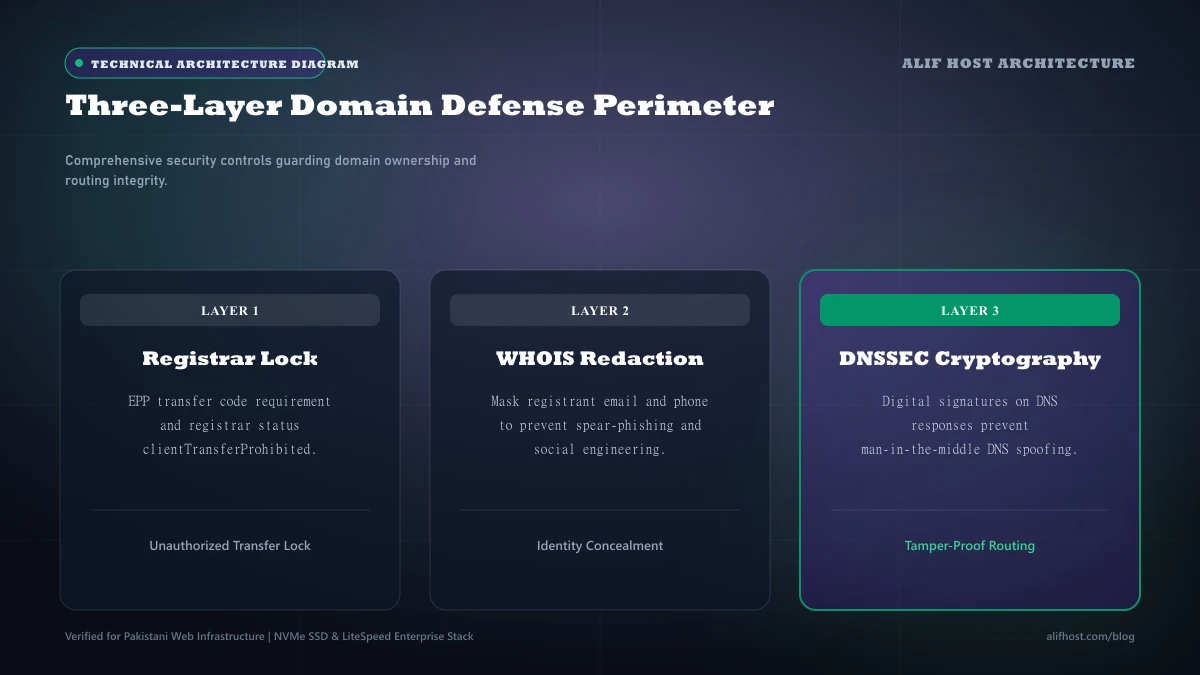
The traditional Domain Name System was engineered without built-in cryptographic authentication. Without DNSSEC (Domain Name System Security Extensions), attackers can execute man-in-the-middle attacks or poison recursive DNS resolver caches, redirecting your legitimate visitors to a spoofed server without their knowledge.
- Public Key Cryptography: DNSSEC signs DNS lookup records with digital signatures (RRSIG records).
- Chain of Trust: Cryptographic validation originates at the ICANN root zone, descends through the TLD registry, and anchors to your domain’s DS record.
- Browser Confidence: Ensures that when a customer types your domain, their browser is guaranteed to connect to your authentic server IP.
Incident Response Playbook: Immediate Steps When Your Brand Is Cybersquatted
If an unauthorized party has already registered a domain incorporating your registered trademark, follow this structured response protocol:
- Step 1: Document Evidence: Capture timestamped screenshots of the infringing website, WHOIS ownership metadata, and any active phishing or counterfeit sales activity.
- Step 2: Issue Formal Cease-and-Desist: Have legal counsel dispatch a formal demand letter to the registrant contact and registrar abuse desk.
- Step 3: File ICANN UDRP / URS: Initiate an expedited Uniform Domain-Name Dispute-Resolution Policy proceeding to mandate the transfer of the domain.
- Step 4: Report to Threat Intelligence Feeds: Submit the phishing domain to Google Safe Browsing and Microsoft SmartScreen to block browser access globally.
Executive Brand Defense Checklist: Annual Domain Audit Protocol
Corporate brands should execute an annual domain portfolio audit to verify intellectual property defenses and prevent lapses in registry ownership:
- Audit WHOIS & Administrative Contacts: Ensure executive contact email addresses are actively monitored so renewal warnings are never missed.
- Enforce Multi-Year Auto-Renewal: Maintain active billing payment methods on file to prevent accidental domain expiration and redemption fees.
- Monitor Secondary Extension Availability: Continuously monitor emerging relevant extensions to prevent unauthorized impersonation by bad actors.
- Verify Strict DNSSEC and DMARC Alignment: Review quarterly DMARC aggregate reports to ensure zero spoofed outbound emails escape detection.