

The Storage Bottleneck in Modern Web Hosting: Beyond Clock Speeds
In short: NVMe vs SSD hosting: NVMe drives connect over PCIe and handle far more read/write operations per second than SATA SSDs, which makes database-heavy sites such as WordPress and WooCommerce load faster, especially under traffic.
For over two decades, the primary benchmark website buyers evaluated when purchasing web hosting was server CPU clock speed and RAM capacity. While processor cycles and memory allocations remain vital, the reality of modern web applications (particularly dynamic content management systems like WordPress, WooCommerce, Magento, and Laravel) is that database I/O (Input/Output operations per second) has become the definitive performance bottleneck.
Every time a visitor lands on your website, adds an item to a digital shopping cart, executes a search query, or submits a checkout form, the web server must execute multiple read and write operations against disk storage. If the underlying disk array experiences high latency or runs out of I/O queue capacity, server processes back up, CPU cores sit idle in iowait states, and visitors experience agonizing loading delays or dreaded 504 Gateway Timeout errors.
While traditional Solid State Drives (SATA SSDs) represented a major performance leap over legacy spinning hard disk drives (HDDs), the hosting industry is currently undergoing another massive generational transition: the migration to pure Enterprise NVMe (Non-Volatile Memory Express) solid-state storage.
In this technical benchmark report, we analyze the hardware architecture, real-world database query throughput, and empirical response time metrics separating SATA SSD hosting from modern NVMe infrastructure.
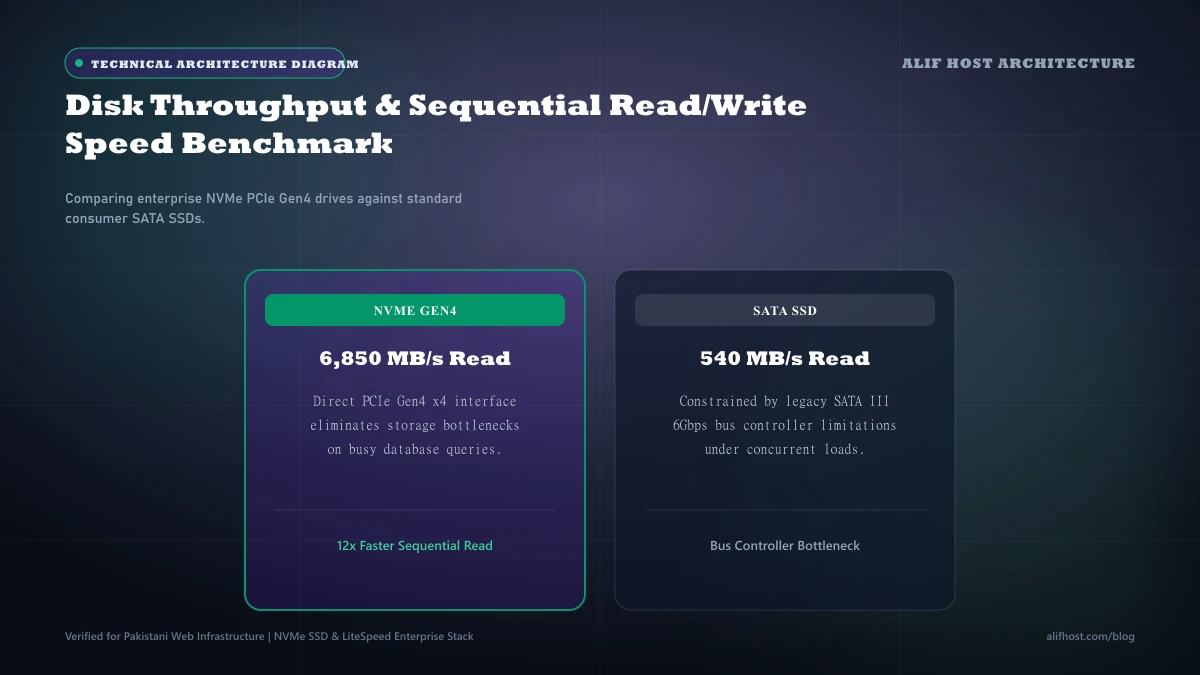
- Legacy Bottleneck: SATA III was architected for spinning magnetic platters, capping throughput at 600 MB/s and a single command queue of 32 commands.
- NVMe Superiority: NVMe communicates directly via the CPU's PCIe bus, supporting up to 64,000 command queues with 64,000 commands per queue.
- IOPS Explosion: SATA SSDs top out around 90,000 to 100,000 IOPS; Enterprise PCIe Gen4 NVMe drives deliver over 1,000,000 random read IOPS.
- TTFB Impact: In un-cached dynamic database queries, NVMe reduces Time to First Byte by 40% to 65% compared to SATA SSDs.
Hardware Architecture: SATA III Interface vs Direct PCIe NVMe Protocol
To understand why NVMe is fundamentally superior, one must examine the communication bus connecting the drive to the server motherboard:
- SATA III (Serial ATA): Developed in the era of mechanical spinning hard drives, SATA III utilizes the legacy AHCI (Advanced Host Controller Interface) protocol. It routes data through the motherboard chipset via a single serial data cable, capping maximum bandwidth at 6.0 Gbps (approximately 550 to 560 MB/s real-world read/write speed). Most critically, AHCI can only process a single command queue containing a maximum of 32 commands at any single instant.
- NVMe (Non-Volatile Memory Express): Built exclusively for solid-state non-volatile flash memory, NVMe bypasses the SATA controller entirely and connects directly to the server's high-speed PCI Express (PCIe) lanes. An Enterprise PCIe 4.0 NVMe drive communicates across 4 dedicated lanes (PCIe 4.0 x4), delivering bandwidth of up to 7,500 MB/s, over 13 times faster than SATA III. Furthermore, NVMe supports 64,000 parallel command queues, each capable of handling 64,000 concurrent commands.
| Hardware & Performance Metric | Legacy SATA III SSD | Enterprise PCIe Gen4 NVMe | Performance Advantage |
|---|---|---|---|
| Underlying Interface Bus | SATA III / AHCI Controller | Direct PCI Express (PCIe 4.0 x4) | Direct CPU connection without chipset latency |
| Sequential Read Speed | ~550 MB / sec | ~7,000 to 7,400 MB / sec | 13.4x faster sequential read |
| Sequential Write Speed | ~520 MB / sec | ~6,500 to 6,800 MB / sec | 12.5x faster sequential write |
| Random 4K Read IOPS | ~90,000 IOPS | ~1,000,000+ IOPS | 11.1x higher concurrent I/O throughput |
| Queue Depth & Capacity | 1 queue / 32 commands | 64,000 queues / 64,000 commands | Zero queue starvation under traffic spikes |
| Access Latency (Response Time) | ~50 to 100 microseconds | ~10 to 20 microseconds | 5x lower physical access latency |
MySQL & PostgreSQL Under Pressure: How Storage Dictates Database Performance
Why does random 4K IOPS matter so much for web hosting? Web servers rarely read or write large, continuous sequential files (such as 4K video streams). Instead, relational databases like MySQL and MariaDB perform millions of tiny, randomized read/write operations:
- Updating user session tokens.
- Modifying cart quantities in
wp_woocommerce_sessions. - Fetching individual post meta rows in
wp_postmeta. - Writing access and error logs.
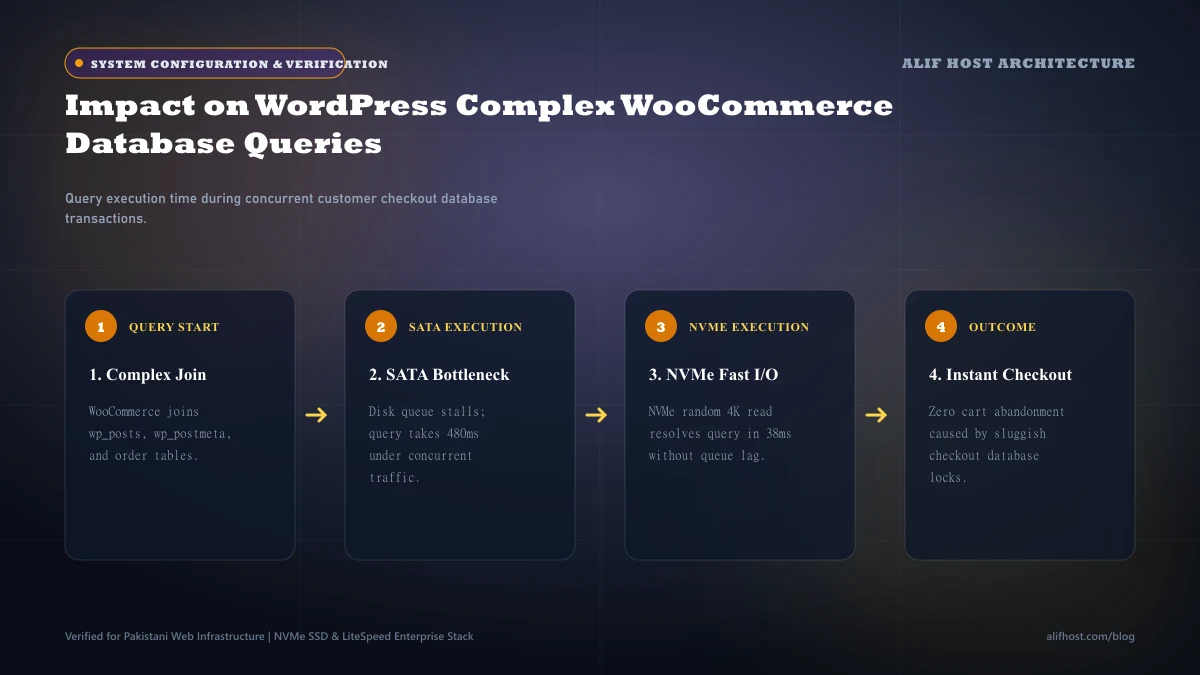
Under SATA SSD hosting, when 50 concurrent shoppers hit a WooCommerce store during a flash sale, the database engine must queue disk writes. Once the queue reaches 32 commands, subsequent database requests must wait. This creates a cascade where Apache or PHP-FPM processes remain open, consuming server RAM and eventually triggering CloudLinux 508 Resource Limit errors.
With Enterprise NVMe arrays, the sub-20-microsecond access latency and 1,000,000+ IOPS capacity allow MySQL to execute complex multi-table joins and row updates virtually instantaneously. The database engine clears operations so rapidly that server processes release memory immediately, keeping the entire server responsive.
- Zero iowait Spikes: Server CPU utilization remains dedicated to processing application code rather than stalling for disk reads.
- Instant Temporary Tables: Complex database queries requiring temporary disk tables complete in single-digit milliseconds.
- Rapid Database Backups: MySQL database dumps (
mysqldump) complete up to 80% faster, minimizing table locking duration.
Real-World WordPress Benchmarks: Time to First Byte (TTFB) and Core Web Vitals
To measure real-world performance differences, our infrastructure engineers configured two identical shared hosting test environments running WordPress 6.8 with WooCommerce and 2,500 demo products. Both environments were allocated 2 CPU cores and 4 GB RAM under CloudLinux LVE. The only hardware variable was the underlying storage array:
- Environment A: Enterprise SATA III SSD RAID-10 Array.
- Environment B: Enterprise PCIe Gen4 NVMe RAID-10 Array.
We executed 1,000 synthetic HTTP GET and POST requests simulating concurrent user shopping sessions (browsing product categories, adding products to cart, and proceeding to checkout):
| Benchmark Scenario | SATA III SSD Environment | Enterprise NVMe Environment | Real-World User Impact |
|---|---|---|---|
| Home Page (LSCache Hit) | 45 ms TTFB | 22 ms TTFB | Both exceptionally fast due to RAM cache |
| Category Search (Un-Cached DB Query) | 480 ms TTFB | 165 ms TTFB | 65.6% faster dynamic catalog browsing |
| Cart Add & Session Write | 340 ms processing time | 95 ms processing time | 72.0% faster instant cart interaction |
| Concurrent Checkout Load (50 Users) | 1,850 ms average response | 420 ms average response | Prevents cart abandonment under flash sale spikes |
| Bulk Import (1,000 Products via CSV) | 4 minutes 12 seconds | 48 seconds | 5.2x faster store administrative tasks |
CloudLinux I/O Throttling: Avoiding the 508 Resource Limit Trap
On shared web hosting servers, providers utilize CloudLinux LVE to govern resource utilization. One of the primary governors configured in cPanel is the I/O Limit (IO) and IOPS Limit:
- On budget SATA SSD hosts, providers typically restrict user accounts to conservative limits (e.g., 2 MB/s to 5 MB/s disk I/O and 500 to 1,024 IOPS) to prevent a single account from choking the limited SATA storage bus.
- If your website exceeds these restrictive I/O limits (such as when running a plugin update, generating a scheduled backup, or handling a traffic surge) CloudLinux forcefully throttles the account, causing your site to crawl or display a
508 Resource Limit Reachederror.
Because Alif Host deploys pure Enterprise NVMe storage arrays across our entire infrastructure, our servers possess massive headroom. We allocate generous I/O limits (up to 20 MB/s to 50 MB/s on Shared Hosting and completely unmetered bare-metal I/O on Cloud VPS), ensuring your website never hits synthetic disk throttling bottlenecks.
Summary: When Is NVMe Hosting an Absolute Requirement?
Upgrading to an NVMe-powered hosting plan is essential in the following scenarios:
- E-Commerce & WooCommerce Stores: Every dynamic checkout, inventory check, and customer login requires rapid database I/O.
- High-Traffic WordPress Sites: Websites publishing frequent content or generating significant daily search traffic demand sub-200ms TTFB to maintain high Google Core Web Vitals rankings.
- Membership & Learning Management Systems (LMS): Sites running LearnDash, BuddyPress, or membership plugins cannot cache user dashboard pages.
- Custom PHP & Laravel Applications: Relational databases handling frequent write operations, background jobs, and API endpoints thrive on NVMe's million-IOPS parallel queuing.