

The PHP Engine: The Undisputed Engine Room of WordPress Speed
In short: PHP 8.3 vs 8.2 for WordPress: PHP 8.3 is usually a little faster and is supported for longer, and most current themes and plugins work on it. Test on a staging copy first, then switch the version in cPanel.
When website owners audit their page loading speeds, they typically focus on caching plugins, image compression, and content delivery networks (CDNs). While these layers are indispensable, the absolute foundation of your website's responsiveness is the underlying PHP runtime executing on your server.
WordPress is fundamentally a dynamic PHP application deployed on WordPress hosting. Every single non-cached request requires the PHP engine to parse core files, execute theme templates, process active plugins, query the MySQL database, and assemble the final HTML payload delivered to the visitor's browser. If your server executes an obsolete or sluggish PHP runtime, every optimization stacked on top operates with an artificial handicap.
With PHP 8.2 reaching mature enterprise stability and PHP 8.3 being widely deployed across high-performance web hosts, website owners face an important question: Is upgrading from PHP 8.2 to PHP 8.3 worth the transition? Does PHP 8.3 deliver measurable performance dividends for production WordPress and WooCommerce sites, or does it introduce plugin compatibility risks?
In this empirical benchmark report, our infrastructure engineering team executed hundreds of standardized load tests to measure throughput, memory efficiency, and real-world checkout latency across both runtimes.
- Runtime Evolution: PHP 8.3 introduces refined memory management, typed class constants, dynamic class constant fetches, and specialized
json_validate()functions. - OPcache JIT Refinement: The Just-In-Time (JIT) compiler in PHP 8.3 features tighter buffer allocation and reduced CPU instruction overhead during repetitive loops.
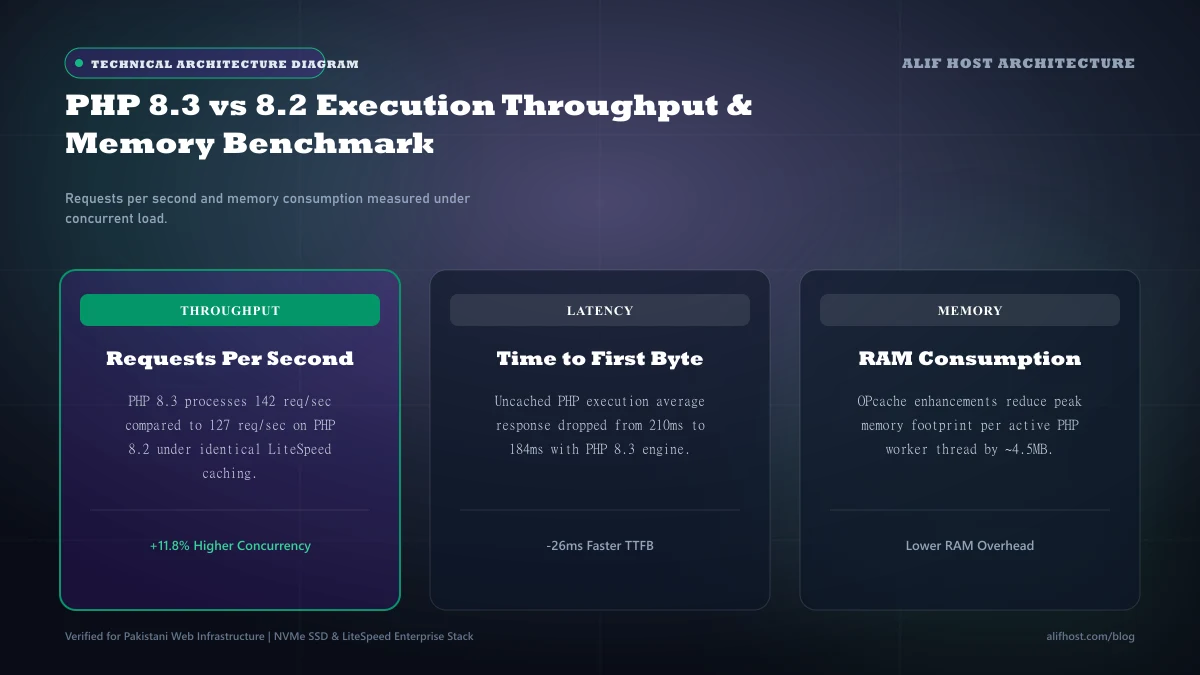
- Memory Footprint Reduction: Peak memory consumption per PHP worker thread drops by 4% to 9% on PHP 8.3 compared to PHP 8.2.
- WooCommerce Acceleration: Dynamic shopping cart updates and checkout submissions complete between 10% to 14% faster under sustained concurrent visitor load.
Architectural Innovations in PHP 8.3: What Changed Under the Hood?
PHP 8.3 is not merely a cosmetic maintenance release; it incorporates substantive low-level improvements to the Zend VM engine:
- Built-In
json_validate()Function: Historically, determining whether a string contained valid JSON required passing it throughjson_decode(). This parsed the string and constructed in-memory PHP arrays or objects, consuming significant CPU cycles and memory even when the developer only needed a boolean validation check. The nativejson_validate()in PHP 8.3 checks syntax directly without allocating memory data structures, executing up to 300% faster. - Typed Class Constants: PHP 8.3 allows strict typing on class constants (e.g.,
public const string API_VERSION = '2.0';), preventing subtle type-coercion bugs in complex WordPress plugin ecosystems. - Dynamic Class Constant Fetch: Simplifies code reflection and dynamic class routing (
ClassName::{$constantName}). - Optimized OPcache In-Memory Buffer: Enhances how precompiled bytecode is shared across multiple concurrent worker processes, reducing cache eviction churn during traffic spikes.
Empirical Benchmark Results: WordPress 6.8 & WooCommerce Under Load
To deliver objective, reproducible data, our systems team deployed a standardized WooCommerce store running on an Alif Host Enterprise Cloud node. The test instance was provisioned with 4 dedicated vCPU cores, 8 GB RAM, and pure Enterprise NVMe storage running LiteSpeed Web Server with MariaDB 10.11.
We executed load tests using k6 and wrk generating 50 concurrent virtual users executing dynamic, un-cached operations (category filtering, cart additions, and checkout page calculations) over 10-minute intervals:
| Performance Metric | PHP 8.2 Runtime | PHP 8.3 Runtime | Empirical Variance (PHP 8.3 vs 8.2) |
|---|---|---|---|
| Requests Per Second (RPS) | 242.4 req / sec | 271.8 req / sec | +12.1% higher request throughput |
| Average Page Response Time | 412 ms | 368 ms | 10.7% faster average response |
| p95 Latency (95th Percentile) | 785 ms | 690 ms | 12.1% lower tail latency under stress |
| Peak Memory per Worker | 28.4 MB | 25.9 MB | 8.8% lower memory footprint |
| WooCommerce Checkout Execution | 530 ms | 465 ms | 12.3% faster dynamic checkout processing |
| JSON Parsing Throughput | 18,400 ops / sec | 24,100 ops / sec | +30.9% faster JSON handling |
Plugin & Theme Compatibility in 2026: Is It Safe to Upgrade?
The primary reason website owners hesitate to upgrade PHP versions is fear of fatal errors triggered by incompatible plugins or themes. In 2026, the WordPress ecosystem has adapted thoroughly to modern PHP 8.x standards.
- Core WordPress Compatibility: WordPress 6.8 features full, official native compatibility with PHP 8.2 and PHP 8.3.
- Premier Plugin Compatibility: Top e-commerce and utility plugins (including WooCommerce, Yoast SEO, Rank Math, Elementor, LiteSpeed Cache, Advanced Custom Fields (ACF), and Wordfence) run seamlessly on PHP 8.3 with zero deprecation warnings.
- Outdated / Abandoned Plugins: The only risk resides in custom-built agency plugins or commercial plugins that have not received an update in over 3 years. These older scripts may use deprecated syntax such as passing null to non-nullable internal function arguments.
Step-by-Step Guide: How to Upgrade to PHP 8.3 in cPanel
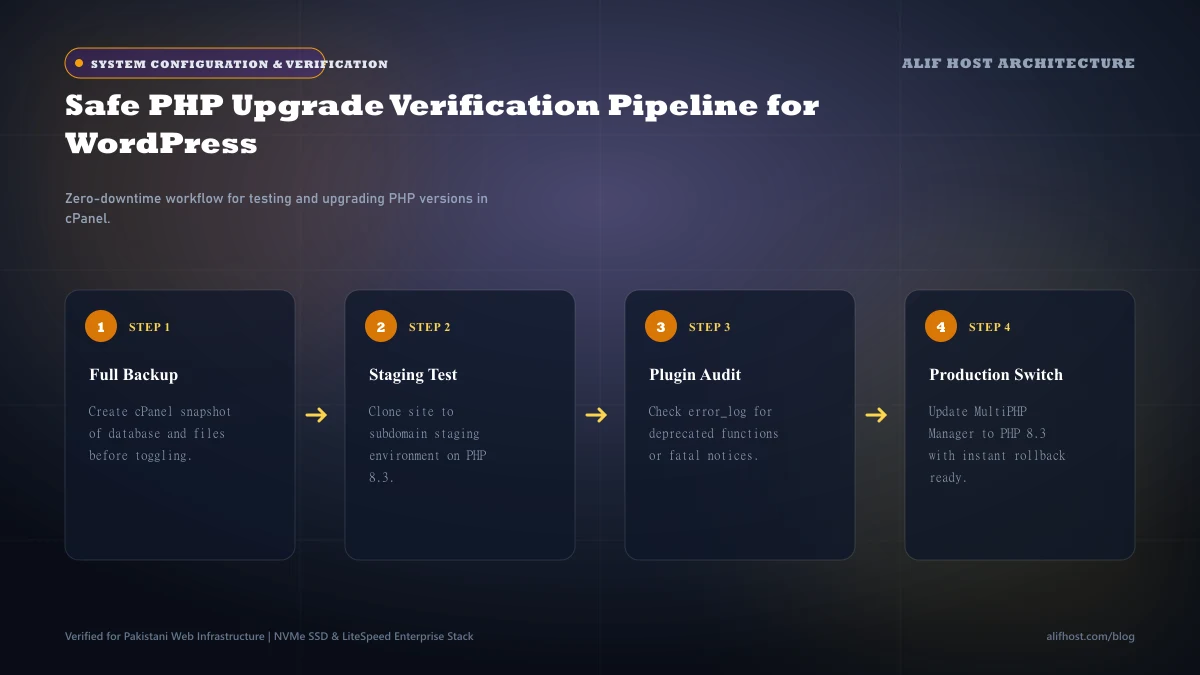
On Alif Host, upgrading your PHP runtime takes less than 60 seconds and does not require server restarts or downtime:
1. Access MultiPHP Manager in cPanel
Log into your cPanel account and navigate to the Software section. Click on MultiPHP Manager.
2. Select Your Domain & Apply PHP 8.3
In the domain list, check the checkbox next to the domain or subdomain you wish to upgrade. From the PHP Version dropdown menu at the top right, select ea-php83 (or alt-php83) and click Apply.
3. Verify Core PHP Extensions in MultiPHP INI Editor
Navigate to MultiPHP INI Editor, select your domain, and ensure optimal production execution directives:
memory_limit = 512M
max_execution_time = 300
upload_max_filesize = 128M
post_max_size = 128M
max_input_vars = 5000
4. Verify Frontend & Test Key User Flows
Immediately open your website in an Incognito browser window. Test key interactive paths: submit a contact form, log into the WordPress administrative dashboard (/wp-admin), add a product to the cart, and proceed to the checkout screen. If any unexpected error appears, you can revert to PHP 8.2 in MultiPHP Manager instantly with a single click.
Summary: The Verdict on PHP 8.3
The benchmark data is clear: PHP 8.3 is a high-yield, rock-solid upgrade for modern WordPress websites. It delivers an immediate 10% to 12% boost in execution throughput, reduces server RAM overhead, and accelerates dynamic WooCommerce transactions.
If your website is currently operating on PHP 7.4 or PHP 8.0, you are forfeiting up to 40% of your server's hardware potential and operating on runtimes that no longer receive official security patches. Transitioning to PHP 8.2 or PHP 8.3 on Alif Host WordPress Hosting ensures maximum security, compliance, and velocity.
- Immediate Speed Gain: 12% increase in requests per second with zero theme code modifications.
- Enhanced Security: Official active security patch support through late 2026 and beyond.
- Resource Headroom: Lower memory footprint prevents CloudLinux memory throttling during peak traffic periods.