


Why WordPress Speed Directly Impacts Conversions and Search Rankings
In short: To speed up WordPress, use fast hosting with server-level caching (such as LiteSpeed Cache), compress and lazy-load images, remove heavy plugins, run a current PHP version and add a CDN. The 10 steps below go through each one.
In modern web development, page load latency is not merely a technical luxury; it is a fundamental business metric. Google incorporates Core Web Vitals (specifically Largest Contentful Paint [LCP], Interaction to Next Paint [INP], and Cumulative Layout Shift [CLS]) directly into its search ranking algorithm. Independent user experience studies demonstrate that every additional second of mobile loading latency reduces e-commerce conversion rates by up to 20%. In Pakistan, where over 80% of web traffic originates from mobile devices connected to cellular data (such as 4G networks from Jazz, Zong, or Telenor), minimizing page byte weight and server response times on our WordPress hosting is critical to prevent visitor bounce.
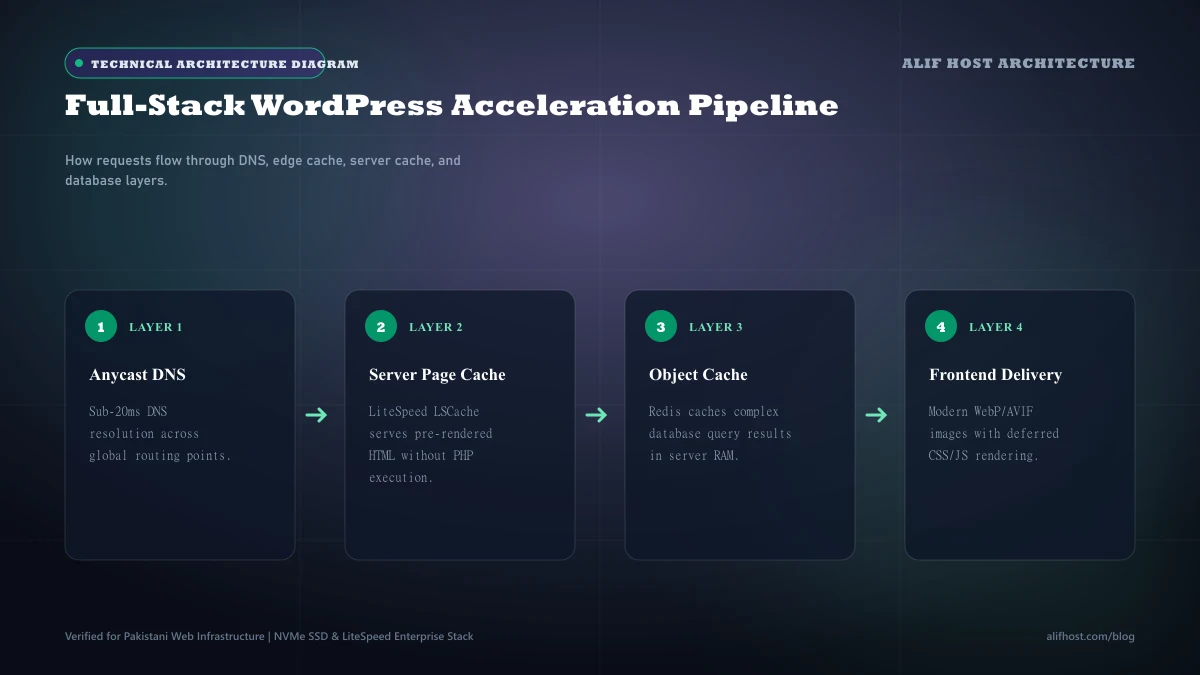
- Search Engine Ranking Advantage: Fast-loading websites gain crawling priority from Google search spiders and rank higher for competitive keywords.
- Lower Bounce Rates: Over 50% of mobile users abandon pages that take longer than three seconds to display content.
- Reduced Server Load: Efficient page caching reduces dynamic PHP requests by up to 90%, allowing your hosting plan to handle far more simultaneous visitors.
Tactic 1: Leverage Server-Level LiteSpeed Cache (LSCache)
Standard WordPress caching plugins execute dynamic PHP code on every cache lookup, consuming server processing power just to verify whether a cached page exists. On LiteSpeed-powered hosting, caching occurs directly within the web server daemon itself. The web server intercepts incoming requests and delivers pre-rendered HTML without ever executing WordPress core or querying the MySQL database.
- Install the official LiteSpeed Cache plugin directly from the WordPress repository.
- Enable "Page Caching", "Mobile Caching", and "Private Caching" for logged-in users.
- Configure automated stale cache purging when posts, comments, or inventory levels are updated.
- Enable ESI (Edge Side Includes) to serve personalized elements (like cart icons) on fully cached dynamic pages.
- Enable LiteSpeed Guest Mode and Guest Optimization to deliver instant initial views to first-time mobile visitors across Pakistani ISPs.
Tactic 2: Modern Image Compression and Next-Gen WebP Formatting
Uncompressed photographs and oversized graphics represent over 70% of the total byte weight of typical web pages. Serving raw JPEG or PNG images directly from cameras or stock photo libraries severely degrades mobile Largest Contentful Paint scores.
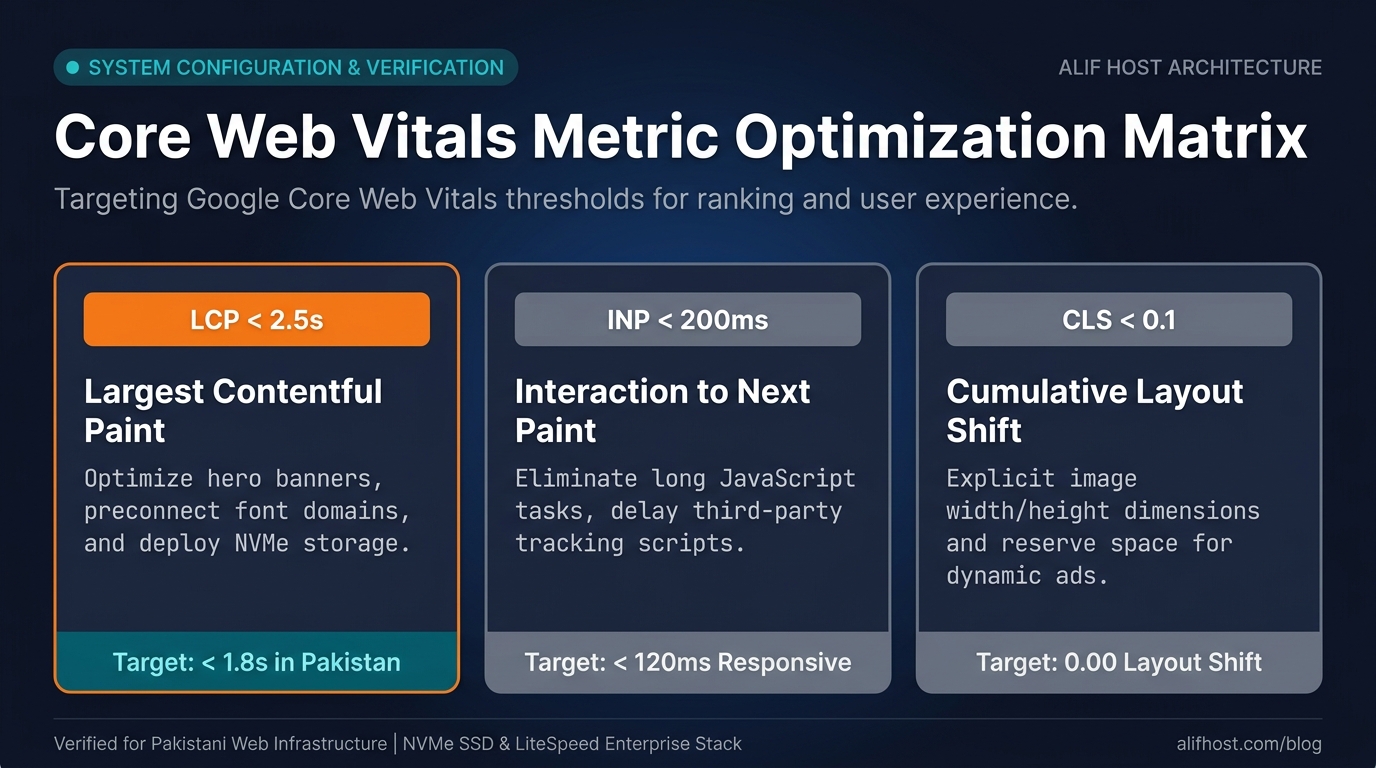
- Convert all media assets to modern WebP or AVIF formats, which deliver 30% to 50% smaller file sizes at identical visual fidelity.
- Ensure responsive
srcsetattributes are enabled so mobile devices do not download desktop-resolution banners. - Enforce explicit
widthandheightdimensions on all image tags to prevent Cumulative Layout Shift (CLS). - Utilize native browser lazy-loading (
loading="lazy") for all media situated below the initial viewport fold.
Tactic 3: Database Optimization and Transient Cleanup
Over time, WordPress databases accumulate thousands of orphaned records, post revisions, spam comment metadata, and expired transient options. This database bloat slows down every backend SQL query.
- Limit Post Revisions: Add
define('WP_POST_REVISIONS', 5);towp-config.phpto prevent post revision accumulation. - Clean Expired Transients: Clear orphaned transients from the
wp_optionstable using tools like WP-Optimize or Advanced Database Cleaner. - Optimize Database Tables: Run monthly InnoDB table defragmentation directly through cPanel phpMyAdmin.
- Disable Native Virtual WP-Cron: Set up a real Linux cron job in cPanel to execute scheduled tasks efficiently in the background. Follow our comprehensive cPanel cron jobs guide to replace virtual WP-Cron with a real 15-minute Linux schedule.
Tactic 4: CSS and JavaScript Delivery Optimization
Render-blocking JavaScript and external stylesheets delay the browser from painting the first visual elements on screen. Streamlining how assets load significantly improves perceived performance.
- Generate Critical CSS: Inline above-the-fold styling directly into HTML headers so content renders immediately while full stylesheets load asynchronously.
- Defer Non-Essential JavaScript: Apply the
deferorasyncattribute to analytical trackers, live chat widgets, and social sharing scripts. - Minify HTML, CSS, and JS: Remove comments, line breaks, and whitespace from code files to reduce payload transfer sizes.
- Eliminate Unused Plugin Stylesheets: Dequeue styling files on pages where the associated plugin is not actively used.
Tactic 5: Implement In-Memory Redis Object Caching
While full-page caching speeds up public visitor requests, it cannot cache logged-in WordPress users, WooCommerce checkout flows, or backend administrator dashboards. Object caching solves this by storing complex database query results in server RAM using Redis or Memcached. When WordPress needs to load product attributes or user metadata, it retrieves the compiled objects directly from memory in microseconds rather than executing repetitive MySQL disk reads.
- Activate the Redis Object Cache plugin or enable the Redis daemon in your LiteSpeed Cache configuration.
- Ensure your hosting environment supports dedicated Unix socket or localhost Redis connections.
- Watch database query execution times drop by 60% to 80% on complex dynamic pages.
Tactic 6: Tame the WordPress Heartbeat API and Admin-AJAX Polling
The WordPress Heartbeat API (/wp-admin/admin-ajax.php) utilizes continuous AJAX polling to synchronize data between the browser and server, managing post auto-saves, revision locks, and dashboard notifications. On active sites with multiple editors, Heartbeat sends POST requests every 15 seconds, creating high server CPU spikes and throttling shared hosting accounts.
- Modify Heartbeat intervals using the Heartbeat Control plugin or LiteSpeed Cache settings.
- Reduce polling frequency from 15 seconds to 60 or 120 seconds in post editor screens.
- Completely disable Heartbeat execution on the frontend of your website where it serves zero functional purpose.
Performance Optimization Checklist: Before vs After Benchmarks
Review the technical benchmarks below illustrating typical performance improvements achieved after implementing server-level LiteSpeed caching, image compression, and database tuning.
| Metric | Unoptimized WordPress Site | Optimized on LiteSpeed Hosting | Performance Gain |
|---|---|---|---|
| Time to First Byte (TTFB) | 850 ms to 1,400 ms | 120 ms to 250 ms | Up to 80% faster |
| Largest Contentful Paint (LCP) | 3.8 seconds | 1.2 seconds | Passes Core Web Vitals |
| Total Page Payload | 4.2 MB | 1.1 MB | 73% bandwidth reduction |
| Total HTTP Requests | 88 requests | 32 requests | 63% fewer round trips |
| Server CPU Load under 50 Users | 92% CPU saturation | 8% CPU utilization | Handles 10x traffic spikes |